Quick answer
The Search Console generative AI report shows how often links to your pages appeared in AI Overviews and AI Mode on Google Search. Google calls it the generative AI performance report. Its help page documents impressions only, by page, country, date, and device. Those impressions are already part of your Web search data, so compare the two reports and never add them.
Key takeaways
- Google's generative AI performance report counts impressions: how often links to your site were shown in AI Overviews and AI Mode.
- Google launched it on June 3, 2026, for a subset of sites. Its help page says it reached all websites worldwide as of August 31, 2026.
- Clicks, CTR, position, queries, and a split between AI Overviews and AI Mode are not listed in Google's help page (checked Oct 27, 2026).
- The data is already part of the Web search type in the Performance report. It is a breakout, not extra traffic.
- A missing report usually means too few AI impressions, or a site excluded under Settings > Search generative AI.
- Join the two Pages exports by URL to estimate each page's AI share. Compare the reports, and never add them.
On this page (8)
What is the generative AI performance report in Search Console?
The generative AI performance report is a Search Console report that counts how often your links were shown in AI Overviews and AI Mode. Google's help page documents one metric for it: impressions. Google's Search Central blog announced it on June 3, 2026, for "a subset of websites." The help page now says it reached all websites worldwide as of August 31, 2026.
The help page lists two features it covers, AI Overviews and AI Mode. Google says it expects "to update this list over time." None of this is new traffic, though. Google says the report "includes data from the Web search type in the Performance report (Search results)." So the AI impressions here are already inside your Web numbers. Treat the report as a closer look at data you had, not as extra visits.
Where is the report, and why might it be missing?
The report opens from its own Search Console address, and it is usually missing because the site has too few impressions in AI Overviews and AI Mode. A menu path is not listed in Google's help page (checked Oct 27, 2026). This is the address the help page links to:
https://search.google.com/search-console/performance/search-analytics/ai
If the report does not appear, the usual reason is volume. Under "Not seeing the report?", Google says this "usually happens when your site hasn't received enough impressions in generative AI features." A young site usually has few impressions of any kind, so an empty report is likely there. The second documented cause is a setting. Someone may have excluded the site under Settings > Search generative AI. In that case, Google says, "You won't receive any traffic or impressions from these features." With no impressions, there is nothing to report.
What counts as an impression in AI Overviews and AI Mode?
An impression counts each time a link to your site is shown in AI Overviews or AI Mode. Google says standard impression rules apply to both. Its page on impressions, position, and clicks gives the details.
- A link must be shown. Google defines an impression as a user having "seen (or potentially seen) a link to your site."
- In a carousel or an expanding section, an item must "typically be scrolled into view" or expanded by a click to count.
- An AI Overview "occupies a single position in search results." Every link in it shares that position.
- A follow-up question in AI Mode counts as a new query. Its impressions belong to that new query.
- A click on a link to an external page counts as a click, in AI Overviews and in AI Mode.
- Google says these rules "are subject to change."
The chart and the table also count in different ways. By default the chart counts by property. So two of your links in one AI answer make one impression. Add a URL filter, and the chart counts by URL instead. The Pages table counts by page, and Google says that is the usual reason its totals can differ from the chart. Pages are grouped by the final URL after any redirects. Google adds that "most performance data in this report is assigned to the page's canonical URL." So a duplicate URL's data usually shows up under its canonical URL. The newest data can be preliminary. It shows as a dotted line, and it can still change.
What does the report leave out?
Google's help page for the Search Console generative AI report lists no clicks, CTR, position, or queries (checked Oct 27, 2026). It documents impressions and four ways to break them down. The right column lists what the help page leaves out, which does not prove the report lacks it. Google's launch post says it may add "additional metrics over time." So check again before you rely on the list. The Web: multimodal filter came later, too. Google announced it for the Performance report and the generative AI report on September 24, 2026.
| Documented in Google's help page | Not listed in Google's help page (checked Oct 27, 2026) |
|---|---|
| Impressions: links to your site shown in AI Overviews and AI Mode | Clicks |
| Pages, grouped by the final URL after any redirects | Click-through rate (CTR) |
| Countries, by where the search came from | Average position |
| Dates, by day, week, or month, in Pacific Time. Google says dates work as in the Performance report, whose help page adds hourly data in the 24-hour view | Queries |
| Devices: desktop, tablet, or mobile | A split between AI Overviews and AI Mode |
| Search type: Web: text-based, or Web: multimodal, which covers Google Lens, Circle to Search on Android, uploaded images, and Chrome image search |
- ChatGPT and Perplexity answers are not on Google Search, so they are not in this report.
- The Gemini app is not mentioned on the help page. It lists only AI Overviews and AI Mode (checked Oct 27, 2026).
- Generative AI features in Google Discover have a separate report.
- Search Labs experiments are excluded "as these experiments are still in active development."
Visits from those AI apps reach your analytics instead, usually as referrals from their domains. The guide to AI referral traffic shows how to group them in GA4. Two export details matter for the next step, too. Values shown as ~ or - in the report become zeros in the download. So a zero can mean "not available." And the usual 1,000-row limit applies, so a large site may not see every page in the table.
How do you compare it with the Performance report?
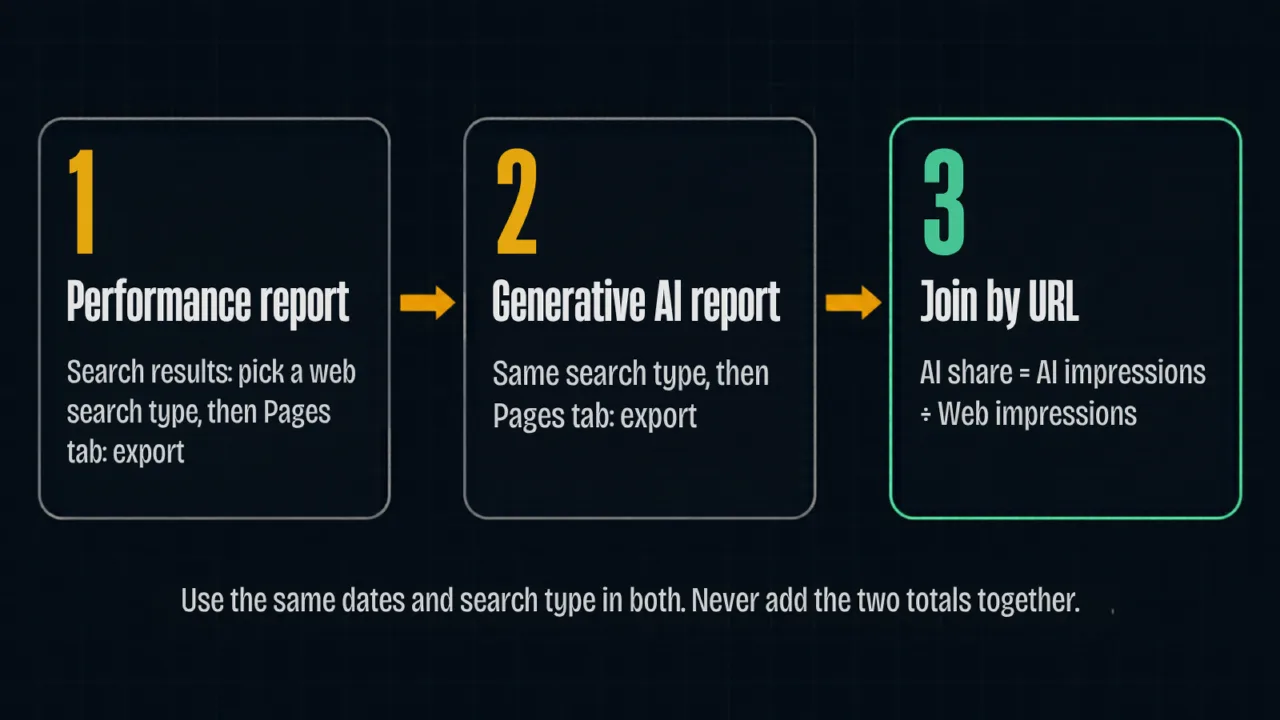
You compare the Search Console generative AI report with the Performance report by exporting both Pages tables and joining the rows by URL. Use the same dates and search type in both. That gives each page an approximate AI share. It is the part of a page's Web impressions that came from AI Overviews and AI Mode.
- Pick one date range, and use it in both reports.
- In the Performance report for Search results, pick a web search type, text-based or multimodal. Open the Pages tab and export.
- In the generative AI report, pick the matching search type. Open the Pages tab and export.
- Paste both exports into one sheet, and match the rows by URL.
- For each page, divide AI impressions by Web impressions. That ratio is the page's AI share.
Treat the ratio as approximate. Both Pages tables count by page, which is what makes the join work. Google says page data in each report "is aggregated by page." Still, each Pages table shows at most 1,000 rows, so a page in one export may have no match in the other. A share above 100 percent most likely means two rows did not match cleanly. Never add the two reports together. The AI impressions are already inside the Web impressions, so adding them counts them twice.
In a spreadsheet, put Web impressions in column B and AI impressions in column C. This formula in column D gives the AI share. It leaves the cell blank when a page has no Web impressions. The template below also has columns for clicks, CTR, average position, and notes.
=IF(B2=0,"",C2/B2)
AI share join sheet (CSV)
A blank template: a header row and one formula row, with no data. Opens in Google Sheets, Excel, or Numbers.
Once the sheet is filled in, the AI share can sit next to the other columns of a content audit template. Then each page's keep, improve, merge, or remove decision can take it into account.
What do the patterns suggest, and what do you check next?
The patterns in the join are hypotheses to test, not diagnoses, because the report shows impressions and not the reasons behind them.
| Pattern in your data | Hypothesis to test | What to check next |
|---|---|---|
| A page ranks in the top 10 for question searches but has no AI impressions | The answer may be hard to lift out of the page | Whether each section opens with a short, direct answer under a question heading |
| High AI share, and clicks falling in the Performance report | Searchers may be reading the answer and not clicking | The page's clicks and CTR over the same dates, before you rewrite anything |
| Most AI impressions come from Web: multimodal | Images or products on the page may be doing the work | The images on those pages and the text that describes them |
| A sudden drop across the whole site | A changed setting, an indexing problem, or a core update | Settings > Search generative AI first, then indexing, then the dates of any Google core update |
| A dip in only the last day or two | Preliminary data that is still being collected | Whether that part of the line is dotted, since Google says it can change within hours |
| No report at all | Too few AI impressions, or an excluded site | Whether the pages that matter are indexed, then the control setting |
Each impression here is a link to your page shown in an AI answer. That makes it one kind of AI citation. For the first pattern, I would start by testing an answer capsule under each question heading. The free AEO Checker grades each section of a page for one. For the second pattern, the question is why a page earns impressions but no clicks. That needs the Performance report's clicks over time, not this report.
Should you exclude your site from Search generative AI features?
Exclude your site only if you accept losing every link and impression in AI Overviews, AI Mode, and Discover's generative AI features. The control is under Settings > Search generative AI. Google says exclusion stops your site "being linked to within these features." It also says the control "isn't used as a ranking or inclusion signal affecting other parts of Search." Check this report and the generative AI report for Discover first for the impressions you would give up. Clicks are not listed in Google's help page for either report (checked Oct 27, 2026), so you would be weighing impressions, not the clicks at stake. For page-level controls such as nosnippet, the guide to position zero covers each option.
What should a small or new site do with this report?
A small or new site should expect the Search Console generative AI report to be empty or tiny at first. Put the effort into the pages, not the numbers. The report usually appears only once a site has enough AI impressions. A blank screen is a stage, not a verdict. Check it once a month.
- Does the report exist yet? If not, note the date and look again next month.
- Which pages have AI impressions, and are they the pages you want found?
- Did the AI share of your main pages rise, fall, or hold?
- Is Settings > Search generative AI still set the way you chose?
Between checks, work on what you control. Make sure Google can index the pages that matter. Open each section with a direct answer. Keep your business details the same everywhere they appear. Want a second opinion first? The free AI Search Visibility Audit is one option in the table below. Search Console access is optional; as the audit page says, "it makes the findings sharper, but the audit works without it."
| Option | What it covers | When it fits |
|---|---|---|
| Free AI Search Visibility Audit | A 15-minute teardown of your top three ranking gaps: indexability, answer readiness, entity consistency, the first topic cluster to build, and a realistic timeline | You want to know what to fix first |
| Content Audits (paid) | A full content inventory and performance scan, keep / improve / merge / remove recommendations, on-page and internal-linking fixes, and a ranked action list with effort vs. impact | Your join flags many pages, and you want a ranked plan for all of them |
| Neither | The monthly check above and the free join sheet | Your pages already earn AI impressions, and the join flags nothing, or only a few pages you can fix yourself |
Disclosure: I run the free audit, and Content Audits is a service I sell, so weigh the source. If the report already shows AI impressions on the pages you care about, the free monthly check and join sheet may be all you need.
Sources
- Search Console Help: Generative AI performance report (Search) (opens in a new tab) (verified Oct 2026)
- Google Search Central Blog, Hillel Maoz and Moshe Samet: Introducing Search Generative AI performance reports in Search Console (June 3, 2026) (opens in a new tab) (verified Oct 2026)
- Google Search Central Blog: Announcing web multimodal Search performance reporting in Search Console (September 24, 2026) (opens in a new tab) (verified Oct 2026)
- Search Console Help: Search generative AI control (opens in a new tab) (verified Oct 2026)
- Search Console Help: What are impressions, position, and clicks? (opens in a new tab) (verified Oct 2026)
- Search Console Help: Performance report (Search results), about the data (opens in a new tab) (verified Oct 2026)
- Search Console Help: Performance report (Search results), troubleshooting data discrepancies (opens in a new tab) (verified Oct 2026)
- Search Console Help: Performance report (Search results), overview and basic setup (opens in a new tab) (verified Oct 2026)
- Search Console Help: Generative AI performance report (Discover) (opens in a new tab) (verified Oct 2026)
- Google Search Central: AI features and your website (opens in a new tab) (verified Oct 2026)
Topics & entities in this article
Frequently asked questions
Google's help page for the generative AI performance report documents impressions only and lists no click metric (checked Oct 27, 2026). Clicks from AI Overviews and AI Mode still count in the Performance report's Web search type. There they are combined with your other Web clicks.
A split between AI Overviews and AI Mode is not listed in Google's help page for the generative AI performance report (checked Oct 27, 2026). That report's documented dimensions are pages, countries, dates, and devices. It also has a search type filter for Web: text-based or Web: multimodal.
Google's help page says a missing report usually means the site hasn't received enough impressions in generative AI features. The other documented cause is a site excluded under Settings > Search generative AI in Search Console. Exclusion stops all impressions from those features.
The generative AI impressions are already part of the regular Performance report. Google says the generative AI performance report includes data from the Web search type in the Performance report. So AI impressions are a subset of Web impressions. Compare the two reports, and never add them, or the AI impressions get counted twice.
Google says the Search generative AI control "isn't used as a ranking or inclusion signal affecting other parts of Search." Excluding does remove your links and content from AI Overviews, AI Mode, and Discover's generative AI features. You then get no traffic or impressions from them.
Google describes the report as covering generative AI features on Google Search. Its help page lists AI Overviews and AI Mode and does not mention AI apps (checked Oct 27, 2026). Visits from ChatGPT, Perplexity, or the Gemini app usually reach your analytics as referrals instead.
Google announced the generative AI performance reports on June 3, 2026, starting with a subset of websites. Its help page says that as of August 31, 2026, the report had rolled out to all websites worldwide.
Related service
Content Audits
A content audit inventories every page on your site and grades what to keep, improve, merge, or remove. The deliverable is a ranked action list your team can execute immediately.
Disclosure: this is a service I sell.