Quick answer
Here is how to change website name in Google Search: add WebSite structured data to your home page with your preferred name, list backups in alternateName, and use the same name in og:site_name and the home page title. Then wait for Google to recrawl the home page. The title link is separate: Google builds it per page, and its list of sources starts with the title element. On Nov 16, 2026, only 129 of 489 top homepages that loaded named their site in WebSite markup.
Key takeaways
- Google's site names guide says "To indicate your site name preference, add WebSite structured data to your home page" and that "WebSite structured data is most important" (doc updated Dec 10, 2025, read Nov 16, 2026).
- Google supports one site name per domain or subdomain, never per subdirectory, and the markup must sit on the home page.
- The title link is a different thing: Google's list of title link sources starts with the title element and the page's main visible title, and Google says it "can't manually change title links for individual sites."
- A change shows only after Google recrawls the home page, which Google says takes "anywhere from several days to several weeks." URL Inspection can ask for a recrawl, with no guarantee.
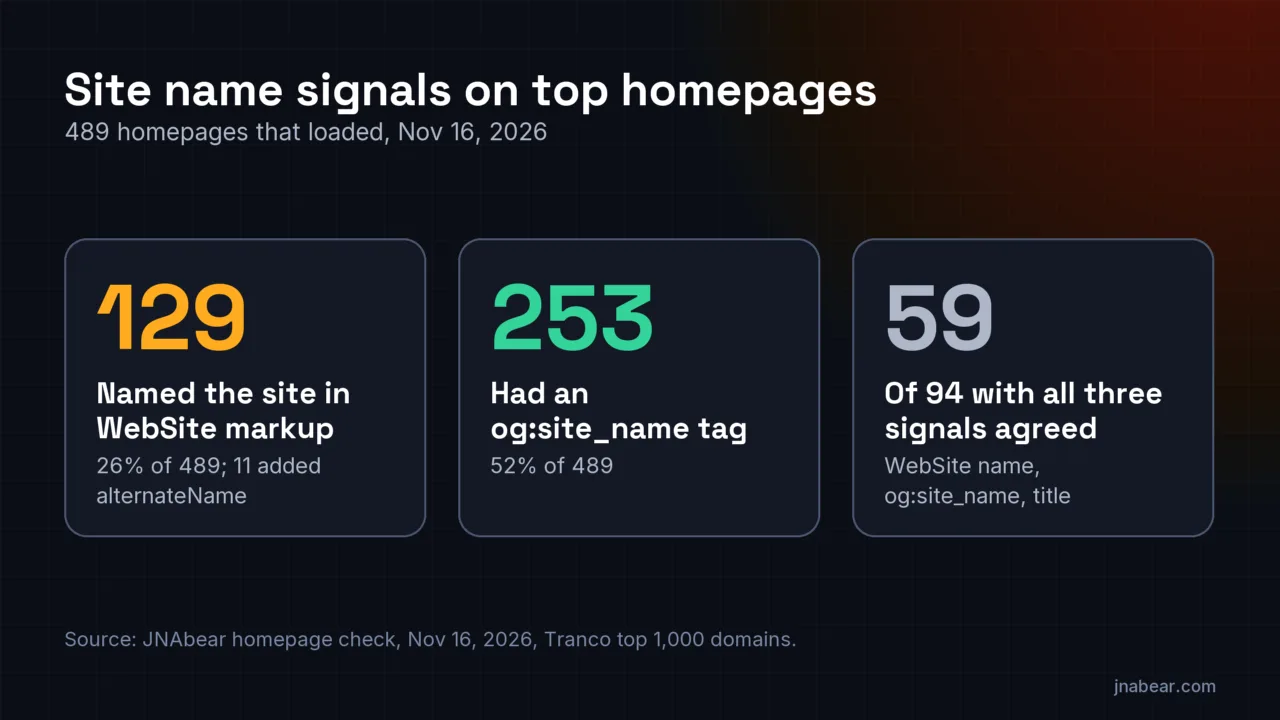
- Of the Tranco top 1,000 domains, 489 returned a homepage on Nov 16, 2026. 153 of the 489 (31%) had a WebSite node, 129 named the site in it, and 11 of those 129 added alternateName on a WebSite node.
- Of 94 homepages with all three signals, 59 (63%) used the same name in WebSite markup, og:site_name and the title. Common misses: a .com suffix, a legal suffix, or a tagline in the name.
On this page (11)
What is a site name in Google Search?
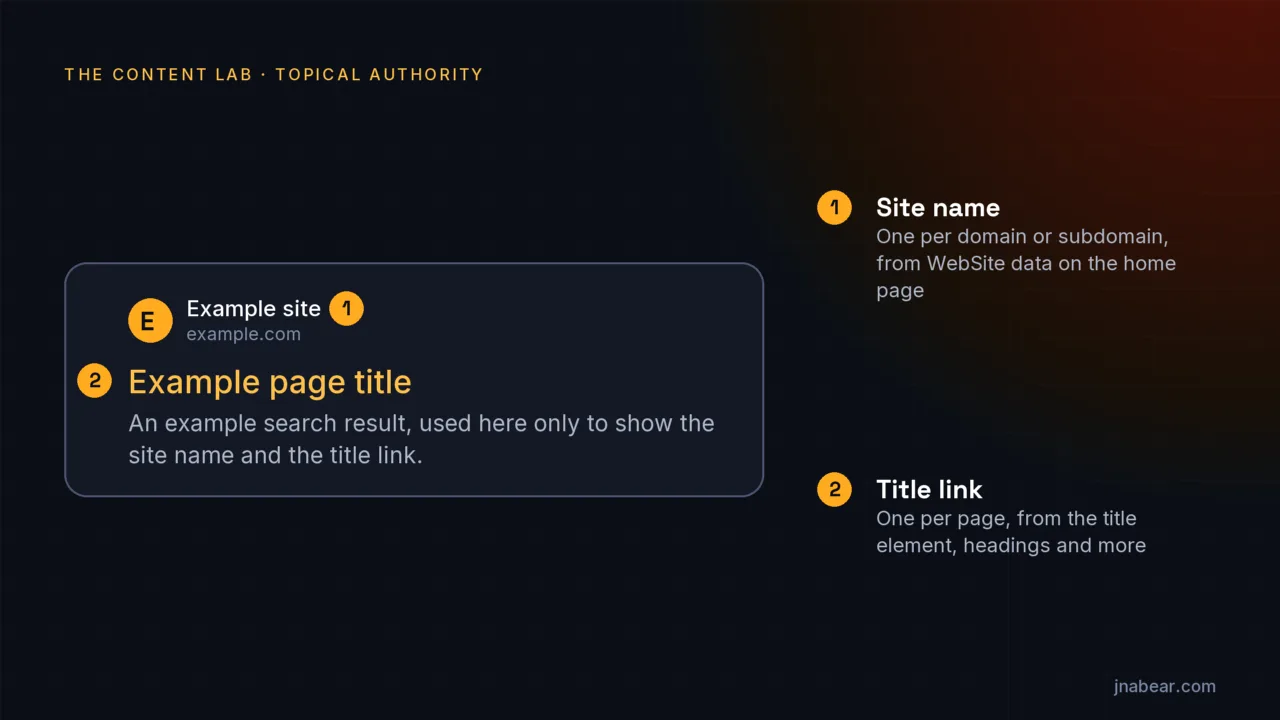
A site name is the name Google shows at the top of a search result to say which website the page belongs to, set once per domain or subdomain and separate from each page's title link.
Google's guide to site names, last updated Dec 10, 2025, defines it in one line: "When Google lists a page in search results, it shows the name of the site the page comes from. This is called the site name." It then draws the line between the two things people usually want to change: "title links are specific to each web page, whereas the site name is for the entire site." So there are two jobs here. The site name is a site-wide setting you influence from one page. The title link is a per-page setting you influence from every page. The icon beside the site name is a third, separate signal, covered in the guide to a favicon not showing in Google.
| Entity | What it is | Its part in the name Google shows |
|---|---|---|
| Site name | The site's name shown on each result | One per domain or subdomain |
| Title link | The clickable headline of a result | One per page |
| WebSite (schema.org type) | A structured data node on the home page | Google's preferred way to state the site name |
| name | A required WebSite property | Your preferred site name |
| alternateName | A recommended WebSite property, text or a list | Backup names, most preferred first |
| url | A required WebSite property | The canonical home page of the domain or subdomain |
| og:site_name | An Open Graph meta tag | Another site name signal Google considers |
| Title element | The page's HTML <title> | First in Google's list of title link sources, and a site name signal on the home page |
| URL Inspection tool | A Google Search Console tool | Shows Google's indexed copy of a URL and can request a recrawl |
Google does the choosing in both cases. The site names guide says the process "is completely automated and takes into account content from a site's home page and references to it that appear on the web." Your markup and your titles state a preference. Google makes the final choice.
How do you change your website name in Google Search?
Add WebSite structured data to your home page with your preferred name in name, backups in alternateName and your canonical home page in url, then use the same name in the home page title and og:site_name.
Google's guide puts the first step plainly: "To indicate your site name preference, add WebSite structured data to your home page." It also names the other text it reads: "Our site name system will also consider content in og:site_name, <title>, heading elements, and other text on a home page. However, WebSite structured data is most important, if you want to specify a preference." So the core of how to change website name in Google Search is one small block of JSON-LD on the home page, the same name elsewhere on that page and on every duplicate of it, then a recrawl.
<script type="application/ld+json">
{
  "@context": "https://schema.org",
  "@type": "WebSite",
  "name": "Example Widgets",
  "alternateName": ["EW", "example.com"],
  "url": "https://www.example.com/"
}
</script>
The example is fictional. name and url are the two required properties. alternateName is optional, and Google says "You can list more than one alternative name. Specify them in order of your preference, with the most important one listed first." Ending the list with your domain in lowercase, as above, follows Google's own troubleshooting example. The rules that trip people up, all from Google's guide:
- One name per site. "Currently, Google Search only supports one site name per site, where a site is defined by the domain or subdomain." A subdirectory such as example.com/news cannot have its own.
- Home page only. "The WebSite structured data must be on the home page of the site." Google adds that "you only need to add this markup to the home page of your site."
- Point url at the canonical home page. Google's wording: "Set this to the canonical home page of your site's domain or subdomain."
- One node, not two. Google says "If you already have WebSite structured data on your site, make sure that you nest the site name properties in the same node," and to avoid "creating an additional WebSite structured data block on your home page if you can help it." So if a plugin already outputs a WebSite node, add the name to that node.
- Let Google crawl the home page. Google says "If we don't have access to the content on your home page because it is blocked, we may not be able to generate a site name."
- Pick a short, real name. Google asks for "a concise, commonly-recognized name for your site" and warns that a generic name is unlikely to be used.
- Test with a schema validator. Google says "Site names aren't supported in the Rich Results Test," and points to the Schema Markup Validator instead.
Google also says it "can't manually change automatically selected site names." No form or support ticket sets the name for you. The markup, the matching text around it and a recrawl are the whole process. In my judgment, check the canonical first: if Search Console reports a Google-selected canonical for your home page that is not the URL in your markup, fix that before you touch the name. Google's guide does ask for the same WebSite block on every duplicate of the home page.
How do you change the title of your page in Google Search?
Edit the page's <title> element and its main visible heading so both describe the page in plain words. Google's list of title link sources starts with those two, but it can pick other text, and it offers no setting to stop that.
Google's title links guide, last updated Dec 10, 2025, defines the term: "A title link is the title of a search result on Google Search and other properties (for example, Google News) that links to the web page." It lists nine sources it uses, starting with "Content in <title> elements", then the "Main visual title shown on the page", heading elements, og:title, other large text, page text, anchor text, link text pointing at the page, and WebSite structured data. The guide says "Google's generation of title links on the Google Search results page is completely automated." It describes no opt-out, and says "we can't manually change title links for individual sites."
| Common issue in Google's guide | What Google may show instead |
|---|---|
| Half-empty title, such as "| Site Name" | A title built from a header or other prominent text |
| Obsolete title with last year's date | The current date from the visible title |
| Inaccurate title that does not match the page | A title that better reflects the content |
| Repeated boilerplate titles across pages | A title with the missing detail, such as a season number |
| More than one equally prominent heading | Possibly the first heading |
| Title in a different language or script from the page | Text that matches the page's main language |
| Site name repeated in the title | The title without the site name, for domain-level site names |
The last row matters for site names. Google says that "In the case of domain-level site names, Google may omit the site name from the title link, if it's repetitive with the site name that's already shown in the search result." Its advice is to brand titles "concisely," with the site name "at the beginning or end of each <title> element, separated from the rest of the text with a delimiter such as a hyphen, colon, or pipe." That is also why the check below looks for the name in one segment of the title, not in the whole title.
How long does a new site name take to show in Google?
A new site name shows only after Google recrawls and reprocesses your home page, which Google says can take from several days to several weeks, and inner pages can take longer again.
The site names guide says: "If you've updated your site name structured data, allow time for Google to recrawl and process the new information. Remember that crawling can take anywhere from several days to several weeks, depending on how often our systems determine content needs to be refreshed." It adds a note for sites whose home page already looks right: "remember to also allow time for Google to recrawl and process your internal pages." Title links follow the same rule. Google says it "has to recrawl and reprocess the page to notice updates to these sources, which may take a few days to a few weeks."
One more detail affects the name you see. The guide says "If your page redirects to a page that's visible to Googlebot, the site name will reflect the redirect target." In practice, after a domain move, a result that redirects to the new domain should show the new site's name.
What can URL Inspection do for a site name change?
URL Inspection in Search Console can show Google's indexed copy of your home page, run a live test and queue a recrawl request, but it does not report the site name, and a request does not promise a faster change.
| URL Inspection can | URL Inspection cannot |
|---|---|
| Show "information about Google's indexed version of a specific page" | Show site name data: site names are not among the rich result types the tool lists |
| Run a live test, which "fetches and examines the URL in real time" | Promise a listing: a "URL is on Google" result "doesn't guarantee that your page is appearing in Search results" |
| Request indexing: "Request that a URL be crawled by Google" | Guarantee indexing: "Submitting a request does not guarantee that the page will appear in the Google Index" |
| Show which canonical Google picked, in the indexed data | Predict the canonical in a live test, which "cannot predict whether or not the tested version will be considered canonical" |
| Accept one request for the home page | Speed things up with repeats: "requesting a recrawl multiple times for the same URL won't get it crawled any faster" |
The Rich Results Test is no help here, since Google's site names guide says "Site names aren't supported in the Rich Results Test." Its testing step is a schema validator for syntax, then "Use the URL Inspection tool to test how Google sees the page." The Search Console help page adds that "Indexing typically takes only a day or so, but can take much longer in some cases," and that "There is a daily limit to how many index requests you can submit." Only an owner or full user of the property can request indexing, per Google's recrawl guide. So the useful sequence is short. Publish the markup, inspect the home page, run the live test to confirm Google can fetch it, request indexing once, then wait.
How do you change the site name on Shopify, Wix, Squarespace, WordPress and Webflow?
Shopify, Wix, Squarespace and WordPress each have a site name or site title setting, and Webflow sets the home page title, but of the help pages read only Yoast's and Rank Math's say they put the name in WebSite markup, so set the name, publish, and check the home page source.
| Platform (help pages read Nov 16, 2026) | Where the name is set | Where the home page title is set | WebSite markup, per the help pages |
|---|---|---|---|
| Shopify | Settings > General > Store contact details > Store name | Online Store > Preferences > Social sharing image and SEO | Not covered in the pages read |
| Wix | Pages & Menu > homepage > SEO Basics > Advanced SEO > Additional tags > og:site_name | Pages & Menu > homepage > SEO Basics > Title tag | Site Search app adds Sitelinks search box markup; your own JSON-LD goes under Advanced SEO > Structured Data Markup |
| Squarespace | Site title, in the site header (7.1) or Design > Logo & Title (7.0) | SEO Settings > Search Appearance > Home > SEO Title Format | Not covered in the pages read |
| WordPress (core) | Settings > General > Site Title | Your theme, or an SEO plugin | Not covered in the page read |
| WordPress + Yoast SEO | Yoast SEO > Settings > Site basics > Website name and Alternate website name | In the plugin's settings | Yes: Yoast writes these into its WebSite node |
| WordPress + Rank Math | Rank Math SEO > Titles & Meta > Local SEO > Website Name and Website Alternate Name | In the plugin's settings | Yes: Rank Math outputs the alternate name as alternateName |
| Webflow | No site name field in the pages read | Pages panel > Page settings > SEO settings > Title tag | Paste your own in the home page's Schema markup field |
Shopify
On Shopify, how to change website name in Google Search starts with two settings in two places. The store name is in Settings > General, under Store contact details. The home page title and description are in Online Store > Preferences, in the "Social sharing image and SEO" section. Shopify's help says "Your theme uses your shop name followed by the title of the content, or it uses the title of the content followed by your shop name." It also warns that "Search engines, such as Google, can choose to rewrite page titles and meta descriptions based on the page content and other signals." The pages I read do not say whether a theme outputs WebSite markup, so view your home page source and search for "WebSite".
Wix
Wix ties the name to the og:site_name tag. Its help page says "The name that appears for your site in search results is the site name tag of your homepage. If you have not entered a site name tag, your title tag is automatically displayed." To change it in the Wix Editor, open Pages & Menu, click the More Actions icon next to the homepage, then SEO Basics, Advanced SEO, Additional tags and og:site_name, edit the value and publish. Google ranks WebSite markup above og:site_name, so a WebSite block matters too. First view the published home page source. Wix says it "automatically adds Sitelinks search box structured data markup to your site's pages when you add the Wix Site Search app," and as I read it, that markup is built on the WebSite type, so a WebSite node may already be there. If none is, Wix accepts your own JSON-LD in the same Advanced SEO tab, under Structured Data Markup: up to five markups per page, each under 7,000 characters.
Squarespace
Squarespace uses the site title. On version 7.1, edit the site header and click the site title, where "Site titles have a 120-character limit." On 7.0, use Design > Logo & Title. The home page's browser and search title comes from the SEO title format, which Squarespace says "is your site title by default." Change it in the SEO/AI Visibility panel, under SEO Settings, then the Home tab of Search Appearance. For a title that shows wrong in results, Squarespace's own advice is to "request a re-index" in Google Search Console.
WordPress, Yoast SEO and Rank Math
Core WordPress has one field. Under Settings > General, the help page for the Site title field says "Enter the name of your site (or blog) here." It adds that "Most themes will display this title, at the top of every page, and in the reader's browser titlebar." The WebSite node usually comes from an SEO plugin. Yoast says its fields overwrite the default WordPress site name in the WebSite markup it outputs, and Rank Math says it outputs the alternate name "as alternateName in structured data." The settings live here:
- Yoast SEO: Yoast SEO > Settings > Site basics, then Website name and Alternate website name.
- Rank Math: Rank Math SEO > Titles & Meta > Local SEO, then Website Name and Website Alternate Name.
Webflow
Webflow sets titles page by page. Its help page says "You can't set SEO settings globally, and SEO settings apply only to the page on which you've set them." Open the Pages panel, then Page settings and SEO settings for the home page, and edit the Title tag. For the site name, paste a WebSite block into the home page's Schema markup field, which Webflow says "appears in the <head> of your published page." Both settings need a paid Site plan or a paid Workspace, and you must publish the site for changes to go live.
What do top homepages send Google for their site name?
Most top homepages send some site name signal, but few use the one Google ranks first. On Nov 16, 2026, 129 of 489 Tranco top 1,000 homepages that loaded named their site in WebSite markup, and 253 had og:site_name.
I requested the homepage of each of the top 1,000 domains on Tranco list Y895G once on Nov 16, 2026, the same fixed sample as the Organization schema sameAs study. 489 returned an HTML page with a 200 status. Of the other 511, 225 did not resolve in DNS, mostly CDN, DNS and ad-serving names that Tranco ranks but that have no homepage. 96 answered 403, and 37 disallowed my crawler in robots.txt. For each of the 489, I read the HTML the server sent, without running JavaScript.
| Step (Tranco top 1,000, Nov 16, 2026) | Domains | Share |
|---|---|---|
| Domains in the sample | 1,000 | n/a |
| Skipped: robots.txt unreachable (225 of these were DNS failures) | 329 | 32.9% of 1,000 |
| Skipped: robots.txt disallows my crawler or all crawlers | 37 | 3.7% of 1,000 |
| Skipped: robots.txt answered 5xx or 429 | 8 | 0.8% of 1,000 |
| Homepage answered with a status other than 200 (96 were 403) | 133 | 13.3% of 1,000 |
| Homepage answered 200 with a file that was not HTML, or timed out | 4 | 0.4% of 1,000 |
| Homepage loaded: 200 and HTML | 489 | 48.9% of 1,000 |
| Any JSON-LD block in the served HTML | 242 | 49.5% of 489 |
| A WebSite node in that JSON-LD | 153 | 31.3% of 489 |
| The WebSite node has a name | 129 | 84.3% of 153, or 26.4% of 489 |
| A WebSite node has alternateName | 11 | 8.5% of 129 |
| An og:site_name meta tag | 253 | 51.7% of 489 |
| A non-empty title element | 472 | 96.5% of 489 |
| No WebSite name and no og:site_name | 201 | 41.1% of 489 |
The other 24 homepages had a WebSite node with no name. The crawl kept only the name, alternateName, url and @id of each node, and these had a url, an @id or both. Of the 129 named nodes, 120 set url to the home page, counting www and non-www as the same. 8 pointed at a path on the same host, and 1 at another host: max.com redirects to hbomax.com, whose WebSite node still says "Max" with a url on max.com. Eleven homepages carried more than one WebSite node, and two of them gave those nodes different names. The 489 homepages ended on 447 distinct hosts, because some domains redirect to the same site.
alternateName was rare, 11 of 129, counting every WebSite node on the page. The New York Times listed four: "NYT", "new york times", "nytimes" and "ny times". TechCrunch listed "TC". Yahoo listed four, ending in "Yahoo.com". rubiconproject.com, which redirects to Magnite's site, put the lowercase domain magnite.com in a second WebSite node. Only 3 of the 11 used a list rather than a single text value. Google's guide says alternateName is where its system looks when it "isn't confident enough to use your preferred name," so most of these sites give Google no backup.
Site name signals on top homepages, Nov 16, 2026 (CSV)
One row per Tranco domain: outcome, whether the homepage had a WebSite node, its name and alternateName, og:site_name, the title text, a yes or no for each pair compared, and the all-three result. No final URLs. Titles from regional editions of a page, and any value that names a country or place, are withheld and marked. The pair and agreement flags were computed before anything was withheld. Free to reuse with a link to this page.
Do the site name signals on a homepage agree?
On most top homepages they agree. Of 94 homepages with all three signals on Nov 16, 2026, 59 (63%) used the same name in WebSite markup, og:site_name and the brand part of the title, ignoring case and punctuation.
Google asks for consistency in so many words: "Make sure whatever you use as the site name in structured data is consistent with how you refer to your site in other sources on your home page that our system considers." So I compared the three after lowercasing them and removing spaces and punctuation. A title counted as matching when any segment between delimiters, such as a pipe, a colon or a comma, equaled the name.
| Pair compared (Nov 16, 2026) | Homepages with both | Same name | Share |
|---|---|---|---|
| WebSite name and og:site_name | 94 | 73 | 77.7% |
| WebSite name and a title segment | 128 | 95 | 74.2% |
| og:site_name and a title segment | 253 | 178 | 70.4% |
| All three | 94 | 59 | 62.8% |
Each pair counts every homepage that had both values. Some of those values are withheld in the CSV, so its wn_eq_og, wn_in_title and og_in_title columns carry the result for each pair, computed before anything was withheld. Counting the yes rows in those columns gives the numbers above.
The misses fall into a few patterns. A domain suffix on one signal only: walmart.com names itself "Walmart" in WebSite markup and "Walmart.com" in og:site_name, and espn.com does the same with "ESPN" and "ESPN.com". A legal suffix: f5.com uses "F5" in markup and "F5, Inc." in og:site_name, though Google's own example prefers "Google" to "Google, Inc". A tagline used as the name: businessinsider.com puts its whole title into the WebSite name. A rename half done: the max.com homepage says "Max" in markup and "HBO Max" in og:site_name and the title. None of this proves Google shows a wrong name for these sites. I did not check what Google displays. It shows how often big sites send Google two answers to one question.
What does jnabear.com send Google for its site name?
On Nov 16, 2026, the jnabear.com home page served one WebSite node named JNAbear, with the home page as its url and no alternateName, plus an og:site_name of JNAbear and a title that ends in JNAbear.
<title>Entity-First SEO Content Strategy & Topic Clusters, JNAbear</title>
<meta property="og:site_name" content="JNAbear">
{
"@type": "WebSite",
"@id": "https://jnabear.com/#website",
"url": "https://jnabear.com/",
"name": "JNAbear",
"description": "AI-powered SEO content, finished by a human.",
"inLanguage": "en-US",
"publisher": {
"@id": "https://jnabear.com/#organization"
}
}
That is one data point, not a benchmark, and this site is not in the Tranco top 1,000. Run through the same check, all three signals agree. The WebSite node sits inside a larger JSON-LD graph, which this site builds in one place in its code, so every page carries the same node. Google only needs it on the home page. In my judgment the extra copies are harmless, and Google's guide does not say otherwise. Two things are missing. There is no alternateName, so the markup offers no backup name. And the home page H1 does not contain the name, though Google says its system will also consider heading elements. If Google ever skips "JNAbear", Google's guide suggests adding the lowercase domain, jnabear.com, as an alternateName backup. This page does not show what Google displays for the site, because no search was run for it.
Why is Google still showing the wrong site name?
Usually the WebSite name is missing or conflicts with the home page text, the name is generic, the site is a subdirectory, or Google has not recrawled the home page since the change was published.
- Check the markup first. Google's first step is to verify that "The site name that's in the WebSite structured data on your home page is the preferred name for your site" and that it has no errors.
- Make the home page agree. Use the same name in og:site_name, the title and the main heading.
- Cover every version of the home page. Google says to use "the same structured data on all page duplicates, not just on the canonical page," such as http and https, or www and non-www.
- Add alternateName. Google says that if it "isn't confident enough to use your preferred name, it strongly considers this option."
- Add your domain as a backup. It "needs to be in all lowercase (for example, example.com not Example.com) for our system to detect this as a site name preference."
- As a last resort, make the domain the name itself. Google says its system "will generally select that (but we recommend only doing this as a last resort)."
- Accept the limits. A subdirectory such as example.com/blog takes the domain's name. And Google says its system "generally won't use the same site name for two different sites that are global in nature."
If none of that works, Google's guide points to the Google Search Central Help Community. That is the end of the road for how to change website name in Google Search: no one at Google sets it by hand. In my judgment, the most common cause on small sites is simpler than any of these: a theme or plugin that never output a WebSite node at all. Among the top homepages, 336 of 489 had none.
How was the site name check run?
I requested the https homepage of each Tranco top 1,000 domain once on Nov 16, 2026, as the AI Crawler Checker's user agent, obeying robots.txt, following up to 5 redirects, with a 20 second timeout and no JavaScript.
The sample is the top 1,000 domains of Tranco list Y895G, generated on Nov 10, 2026 from CrUX, Farsight, Majestic, Radar and Umbrella data for Oct 12 to Nov 10, 2026. It is the same list, in the same order, as the two earlier studies on this site. I rebuilt it from the earlier study's CSV and wrote it to a file before the first request, with no swaps. Each request used the user agent JNAbear-AICrawlerCheck/1.0, the one the AI Crawler Checker sends. It never imitates Googlebot or a browser. Eight domains were checked at a time. The run took about eight minutes.
Before each request, I read robots.txt for every host in the redirect chain, with the same rules as the AI Crawler Checker: the group naming my crawler, or else the * group, with the longest matching rule winning. A domain was skipped if those rules disallowed its home page. A robots.txt that answered 5xx, or could not be reached, counted as a full disallow, as RFC 9309 requires for an unreachable file: "the crawler MUST assume complete disallow." Two that answered 429 were skipped too. That is my cautious reading, not the RFC's, which puts 4xx codes under "Unavailable", where "the crawler MAY access any resources on the server." Six domains resolved to a private or reserved address and were skipped as unreachable. Any other 4xx counted as no rules.
In each homepage, I read the first title element outside any SVG, the og:site_name meta tag, and every application/ld+json block, walking @graph lists and nested nodes. Nodes of type WebSite that shared an @id were merged. Where a page had more than one, I used the named node whose url was the home page, and collected alternateName from every WebSite node. Microdata and RDFa were not parsed, so the WebSite counts are a floor. For the agreement check, the three names were lowercased and stripped of anything but letters and digits, and the title was split on pipes, dashes with spaces around them, colons, commas and similar delimiters. Results can differ by country, by user agent and by day. The CSV withholds titles from pages that redirected to a regional edition, and any value that names a country or a place, so it cannot reveal where the check ran.
Sources
- Google Search Central: Provide a site name to Google Search (updated Dec 10, 2025) (opens in a new tab) (verified Nov 2026)
- Google Search Central: Influencing your title links in search results (updated Dec 10, 2025) (opens in a new tab) (verified Nov 2026)
- Google Search Central: Ask Google to recrawl your URLs (updated Dec 10, 2025) (opens in a new tab) (verified Nov 2026)
- Search Console Help: URL Inspection tool (opens in a new tab) (verified Nov 2026)
- Shopify Help Center: Adding keywords to your online store (title and meta description) (opens in a new tab) (verified Nov 2026)
- Shopify Help Center: Business settings (store name) (opens in a new tab) (verified Nov 2026)
- Wix Help Center: Changing Your Site's Name in Search Results (opens in a new tab) (verified Nov 2026)
- Wix Help Center: Customizing Your Page's SEO Settings in the SEO Panel (opens in a new tab) (verified Nov 2026)
- Wix Help Center: Adding Structured Data Markup to Your Site's Pages (opens in a new tab) (verified Nov 2026)
- Squarespace Help Center: Add a site title (updated Aug 11, 2026) (opens in a new tab) (verified Nov 2026)
- Squarespace Help Center: Change how page titles appear in search engines, browser tabs, and social shares (updated Oct 8, 2026) (opens in a new tab) (verified Nov 2026)
- WordPress.org Documentation: Settings General screen (updated Jul 3, 2026) (opens in a new tab) (verified Nov 2026)
- Yoast: Website name, alternate website name, and alternate organization name (opens in a new tab) (verified Nov 2026)
- Rank Math Knowledge Base: Why Google Displays URL Instead of Site Name in SERP? (opens in a new tab) (verified Nov 2026)
- Rank Math Knowledge Base: Using Rank Math's Local SEO Module (opens in a new tab) (verified Nov 2026)
- Webflow Help Center: Add SEO title and meta description (opens in a new tab) (verified Nov 2026)
- Webflow Help Center: Add schema markup in Webflow to improve SEO and AEO (opens in a new tab) (verified Nov 2026)
- Tranco: list Y895G (generated Nov 10, 2026) (opens in a new tab) (verified Nov 2026)
- RFC 9309: Robots Exclusion Protocol (opens in a new tab) (verified Nov 2026)
Topics & entities in this article
Frequently asked questions
The short version of how to change website name in Google Search: add WebSite structured data to your home page with your preferred name in name, backups in alternateName, and your home page in url. Use the same name in og:site_name and the home page title, then wait for Google to recrawl the home page.
Google falls back to the domain when it is not confident in a name. Google says that if it "is less confident in a name you provided, it may sometimes generate site names using other sources or show a domain or subdomain name." Check the markup, make the home page consistent, and add alternateName.
You can influence it, not set it. Edit the title element and the main heading so both describe the page. Google builds the title link automatically and says it "can't manually change title links for individual sites." It describes no setting that stops it from rewriting a title.
It is one signal. Google says it considers og:site_name, the title and headings, but "WebSite structured data is most important, if you want to specify a preference." On Nov 16, 2026, 253 of 489 top homepages had og:site_name and 129 named the site in WebSite markup.
No. Google says it "does not support site names at the subdirectory level." A subdomain such as news.example.com can have its own name. A path such as example.com/news uses the domain's site name.
Google says crawling "can take anywhere from several days to several weeks," and the name changes only after Google recrawls and reprocesses the home page. You can request indexing of the home page once in URL Inspection, but the request does not guarantee speed.
No. Google says "you only need to add this markup to the home page of your site." Many sites output the same WebSite node on every page. In my judgment that is harmless, and Google's guide does not say otherwise, but Google only asks for the home page copy.
Related service
Web Design & SEO
Web design and SEO in one project: custom WordPress websites for businesses that need a new or rebuilt site.
Disclosure: this is a service I sell.