Alternate Page with Proper Canonical Tag: What It Means, and the Two Duplicate Statuses Next to It
Quick answer
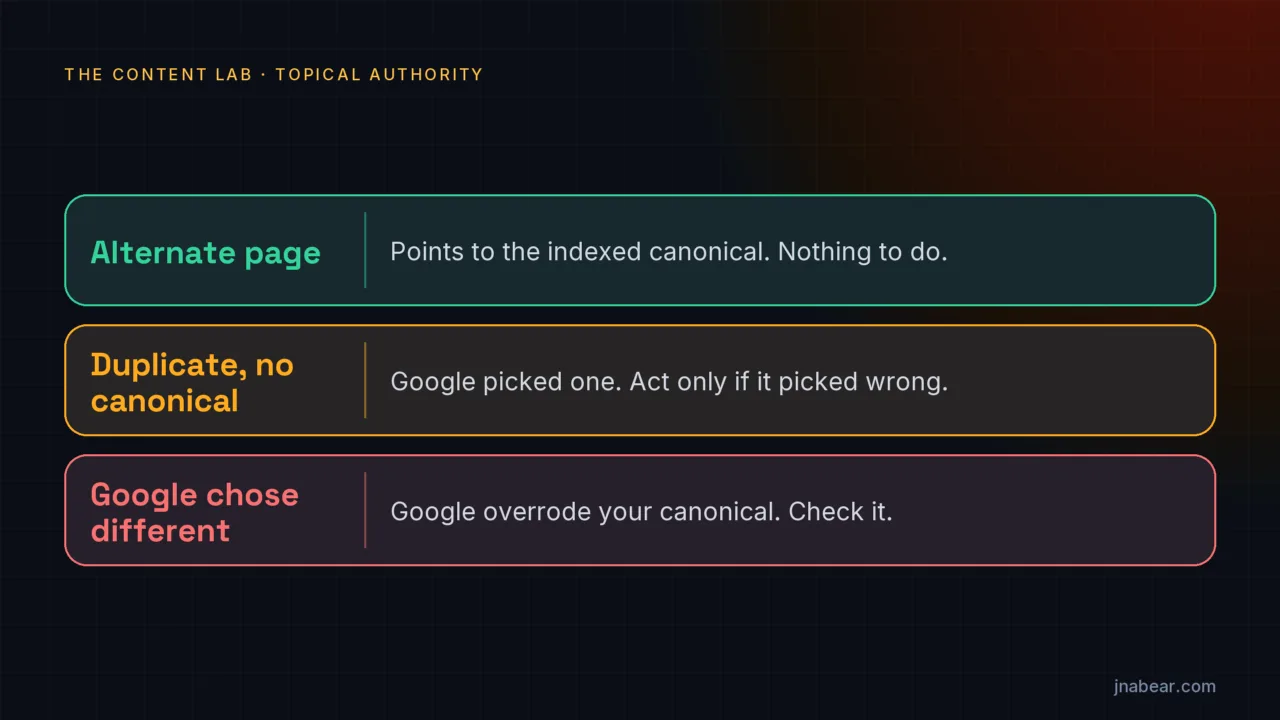
"Alternate page with proper canonical tag" means Google found a duplicate URL that correctly points to your canonical page, and indexed the canonical instead. Google's Page indexing help says "there is nothing you need to do." In my experience it often appears for tracking-parameter, trailing-slash and mobile URLs. The status most worth checking is "Duplicate, Google chose different canonical than user."
Key takeaways
- "Alternate page with proper canonical tag" is not an error. Google's help page says "there is nothing you need to do."
- "Duplicate without user-selected canonical" is "not an error, but is working as intended." Act only if Google picked the wrong page.
- "Duplicate, Google chose different canonical than user" is the one to check. Google's own steps call it "This error."
- Google calls redirects and rel="canonical" strong signals, a sitemap a weak one, and any canonical preference "a hint, not a rule."
- On all 16 sites I tested on Nov 2, 2026 (15 on five platforms, plus this site), a ?utm_source= URL loaded with a canonical to the clean URL. Once crawled, URLs like these are what most sites see under this status.
- Shopify and Squarespace leave trailing-slash URLs live and rely on the canonical tag. WordPress, Wix and Webflow redirect them.
On this page (10)
What does alternate page with proper canonical tag mean?
"Alternate page with proper canonical tag" means Google found a URL that is a copy or variant of another page, saw that it correctly names that other page as canonical, and indexed the canonical instead. It is listed under "Why pages aren't indexed" in Search Console's Page indexing report, but it is not a problem. Google's help page says the page "correctly points to the canonical page, which is indexed, so there is nothing you need to do."
Google gives AMP pages and separate mobile or desktop versions as its examples. In practice, it often shows up for ordinary duplicate URLs: the same page with a tracking parameter, with or without a trailing slash, or in a mobile view. The help page adds one line few guides quote: "Alternate language pages are not detected by Search Console." Translated versions of a page do not show up here. Google's URL Inspection help also still names a fourth status, "Duplicate, submitted URL not selected as canonical," which the current Page indexing help no longer lists.
| Status in the Page indexing report | What Google says | Do you need to act? |
|---|---|---|
| Alternate page with proper canonical tag | The page points to the canonical, which is indexed: "there is nothing you need to do." | No |
| Duplicate without user-selected canonical | A duplicate with no canonical declared; Google picked one. "This is not an error, but is working as intended." | Only if Google picked the wrong URL |
| Duplicate, Google chose different canonical than user | You declared one canonical; Google chose another. Google's steps call it "This error." | Yes, check it |
| Page with redirect | A URL that redirects elsewhere, so "this URL will not be indexed." | No, if the redirect is intended |
Google's Page indexing help sums up the duplicate and alternate statuses in one sentence: "Having a page marked duplicate or alternate is usually a good thing; it means that we've found the canonical page and indexed it." The goal, in Google's words, is "to get the canonical version of every important page indexed," not every URL.
What is a canonical URL, and how does Google choose one?
A canonical URL is the one version of a page Google indexes and shows when several URLs serve the same or very similar content. Google groups the copies into a cluster and picks the version it judges "objectively the most complete and useful for search users," according to its canonicalization guide (updated Aug 20, 2026). Your markup is input to that choice, not an order: "indicating a canonical preference is a hint, not a rule."
| Signal | How Google rates it (consolidation guide, updated Jul 10, 2026) |
|---|---|
| 301 redirect | "A strong signal that the target of the redirect should become canonical." |
| rel="canonical" link | "A strong signal that the specified URL should become canonical." |
| Sitemap inclusion | "A weak signal." |
| HTTPS over HTTP | Google "prefers HTTPS pages over equivalent HTTP pages as canonical," unless the HTTPS page has problems such as an invalid certificate. |
Redirects, canonical tags and sitemaps "can stack and thus become more effective when combined," Google says. Two fields in the URL Inspection tool show the result for any page. "User-declared canonical" is what your page asks for. "Google-selected canonical" is what Google picked. Every canonical status in the report comes down to how those two fields compare.
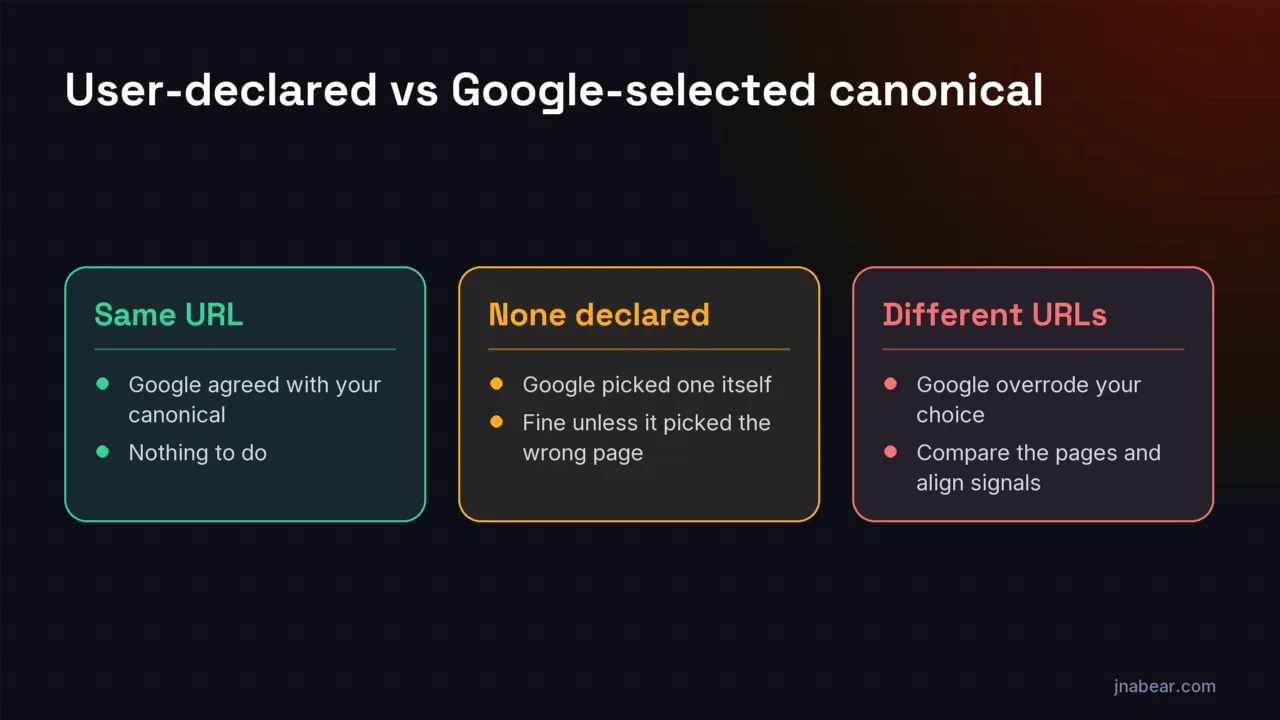
Google also warns that the live test cannot answer this. Canonical choice "is determined at indexing time," and the live test "cannot predict whether or not the tested version will be considered canonical." The Google-selected canonical shown in the tool "can be a few hours out of date" from Google's index.
How do you fix alternate page with proper canonical tag in Google Search Console?
Usually you do nothing. The status means your canonical tags are working, and the page that matters is indexed. Open the URL Inspection tool on one listed URL and confirm that "Google-selected canonical" is the page you want. If it is, leave the status alone. Google says there is nothing you need to do, so there is nothing to fix or validate.
Fix something only in these cases:
- The listed URL is a page you want in Google on its own, not a copy. Then its canonical tag is wrong: it should point to itself.
- URL Inspection shows the canonical it points to is no longer indexed, or now returns a 404 or a redirect. The report is out of date: fix the target first.
- The list keeps growing with search or filter URLs you did not mean to expose. Find where your templates link to them, and link to the clean URL instead. Google's advice is to link "to the canonical URL rather than a duplicate URL."
For a deeper check of which pages are and are not in Google, the guide to pages not ranking walks through the same URL Inspection check.
What does duplicate without user-selected canonical mean?
"Duplicate without user-selected canonical" means this URL is a duplicate of another page, this URL does not declare a canonical, and Google chose the other page as canonical. Google says: "This is not an error, but is working as intended, because Google does not serve duplicate pages." It is common on sites whose platform or theme does not add a rel="canonical" tag to every page.
To solve it, inspect the URL and look at "Google-selected canonical." If Google picked the version you want, you can leave it, or add a self-referencing canonical to make your preference explicit. If Google picked the wrong one, add a rel="canonical" to the right URL on every copy, or 301-redirect the copies to it. If the two pages should not be duplicates at all, Google says to "ensure that the content differs substantially between the two pages."
How do you fix duplicate, Google chose different canonical than user?
Compare the three pages Google points you to, then make the page you want canonical clearly the best and most consistent choice. This status means you declared one canonical and Google chose a different one, so Google disagrees with your signals. Google's steps: inspect the URL, note the "Google-selected canonical" and the "User-declared canonical," and open the current page and both canonicals in a browser.
- If your declared canonical is not similar to the page, Google says it "won't ever choose that URL as canonical." Point the tag at a true duplicate, or remove it.
- If Google picked the page itself, it thinks the page is not a duplicate of anything. That is often right for pages with their own content.
- Make every signal agree: the canonical tag, internal links, the sitemap and any redirects should all name the same URL. Google warns against naming one URL in a sitemap and another in a canonical tag.
- Check for causes Google lists in its troubleshooting guide: a plugin or CMS writing the wrong canonical, a server misconfiguration, syndicated or copied content, and hacked pages with injected canonicals.
Then give it time. If you changed the content so the pages are no longer duplicates, Google says it "might hold pages in a duplicate cluster for up to two weeks," and suggests Request Indexing for your most important URLs. It gives no timeframe for signal-only changes.
What does user-declared canonical: none mean?
"User-declared canonical: None" means the page has no canonical tag, header or other declaration that Google found. Google's URL Inspection help says that "if your page is not an alternate page, the value None is fine here." It matters only when the page is one of a set of duplicates. Then Google recommends declaring the canonical explicitly, and the copies Google does not choose will show as "Duplicate without user-selected canonical."
Alternate page with proper canonical tag vs page with redirect: what is the difference?
An alternate page still loads and points to the canonical with a tag. A page with redirect does not load at all: it sends visitors and Google to another URL. Both keep the duplicate out of the index, and both are expected. Redirects are the firmer choice for duplicates no one should ever see, such as http:// and www versions. Canonical tags suit duplicates that must keep working, such as a tracking link in an email campaign.
Alternate page with proper canonical tag on Shopify, WordPress and Blogger
Each platform creates its own duplicate URLs, so the status shows up for different reasons. These are the patterns I measured on Nov 2, 2026; the full test is in the next section.
| Platform | Duplicate URLs it creates | How it handled them in the test |
|---|---|---|
| Shopify | /collections/{name}/products/{name}, ?variant=, trailing slashes, tracking parameters | Served as live pages with a canonical to /products/{name}. One of three stores redirected the collection URL instead. |
| WordPress | /?p={id}, /page/2/, ?replytocom=, feeds, tracking parameters | /?p= redirected to the permalink on 3 of 3 sites. ?replytocom= got three different treatments: blocked, redirected, and canonical plus noindex. |
| Blogger | ?m=1 mobile URLs, tracking parameters | On the Blogger blog I checked, ?m=1 loaded with a canonical to the clean post URL. |
| Squarespace | Trailing slashes, ?category=, ?tag=, ?offset=, ?format=json | Trailing slashes loaded with a canonical to the clean URL on 3 of 3 sites. On the site with a blog, filters canonicalized to the blog page, and ?format=json had no canonical but is blocked in robots.txt. |
| Wix and Webflow | Tracking parameters, pagination | Trailing slashes redirected. Pagination was inconsistent: some sites canonicalized page 2 to itself, others to page 1. |
So on Shopify and Blogger, a long list of "Alternate page with proper canonical tag" URLs is normal and needs no fix. On WordPress, check one post's page source for rel="canonical" before installing anything: WordPress core adds one to single posts and pages, and SEO plugins extend it to archives.
How do website platforms handle duplicate URLs? A test of 16 sites
Every platform I tested creates duplicate URLs, and all of them used canonical tags to point tracking-parameter URLs at the clean page. On Nov 2, 2026 I requested the same set of URL variants from 16 live sites: three each on Shopify, WordPress, Wix, Squarespace and Webflow, plus this site. A ?utm_source=test URL loaded as a working page with a canonical to the clean URL on all 16. Once Google crawls them, URLs like these are the ones most sites see under "Alternate page with proper canonical tag," although Google's own examples are AMP and mobile pages.
| URL variant | Shopify (3) | WordPress (3) | Wix (3) | Squarespace (3) | Webflow (3) | jnabear.com |
|---|---|---|---|---|---|---|
| ?utm_source=test | Canonical to clean URL | Canonical to clean URL | Canonical to clean URL | Canonical to clean URL | Canonical to clean URL | Canonical to clean URL |
| Trailing slash variant | Live, canonical only | Redirected | Redirected | Live, canonical only | Redirected | Redirected |
| http:// and www variants | Redirected | Redirected | Redirected | Redirected | Redirected | Redirected |
| Page 2 of a list | Canonical to itself (3 of 3) | Canonical to blog home (2 of 3) | Mixed | Canonical to base page (1 site with a blog) | Canonical to itself (2 of 3) | Not applicable |
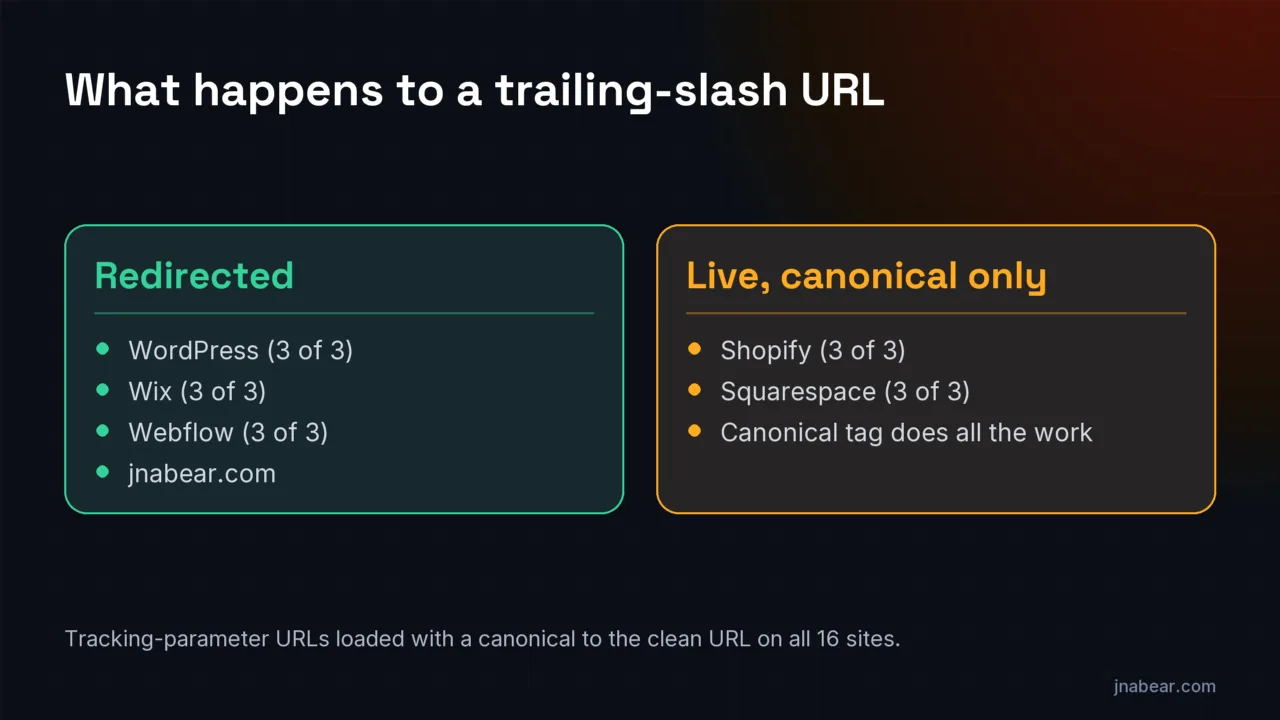
The trailing slash is where platforms split. WordPress, Wix and Webflow redirect the variant to their preferred form, so Google sees one URL. Shopify and Squarespace leave both live and rely on the canonical tag alone. That gives Shopify and Squarespace sites more live duplicates for Google to find, so they may collect longer "Alternate page" lists, through no fault of the owner.
Every site redirected its http:// and www variants to a single https address, often in two hops. This site does too, with one two-hop chain I have yet to collapse. How the test was run: each site's platform was confirmed from its page source, and each variant was requested with its redirect chain and canonical tag recorded. Shopify rate-limited plain command-line requests, so most Shopify rows were checked in a real browser, by final URL rather than each redirect's status code. Sixteen sites show the pattern, not every theme or app on each platform. The Blogger check was a single blog and is not in the 16-site table.
How do you check your own site for canonical problems?
Test six URLs on one of your pages and look at where each lands and what its canonical says. It takes about ten minutes with a browser's view-source.
- Add ?utm_source=test to a page URL. It should load, with a canonical pointing to the clean URL.
- Add or remove the trailing slash. It should redirect, or carry a canonical to your preferred form.
- Try http:// instead of https://, and the www or non-www version. Both should redirect to your one https address.
- Load page 2 of your blog or a product list. Decide whether it should canonicalize to itself or to page 1, and check that it does.
- Try your platform's own duplicate pattern from the table above, such as a collection-scoped product URL on Shopify.
- In Search Console, inspect your most important page and confirm "Google-selected canonical" matches "User-declared canonical."
If any of the six goes wrong, or the "Duplicate, Google chose different canonical than user" list holds pages you need in search, the fix is often a template or plugin setting rather than page-by-page work. A content audit can flag duplicate and canonical problems across a whole site at once, and the free audit checks indexability before you spend anything.
If the platform itself keeps creating duplicates you cannot control, a rebuild settles it at the template level. That is part of our web design work, where canonicals, redirects and internal links are set once for every page.
| Option | What it covers | Price |
|---|---|---|
| The six checks above | One page, one platform, ten minutes | Free |
| Free AI Search Visibility Audit | Indexability, answer readiness, entity consistency and the first fixes to make | Free |
| Content Audits | Every page graded keep, improve, merge or remove, with on-page and internal-linking fixes in a ranked action list | From $750 |
| Web Design & SEO | A rebuild with technical SEO in the foundation, including canonicals and redirects | From $3,500 |
Disclosure: I sell the audits and builds in that table, so weigh my view of when you need them. For most sites with only "Alternate page with proper canonical tag" in the report, you need none of them.
Sources
- Google Search Console Help: Page indexing report (opens in a new tab) (verified Nov 2026)
- Google Search Console Help: URL Inspection tool (opens in a new tab) (verified Nov 2026)
- Google Search Central: What is URL canonicalization (updated Aug 20, 2026) (opens in a new tab) (verified Nov 2026)
- Google Search Central: How to specify a canonical URL (updated Jul 10, 2026) (opens in a new tab) (verified Nov 2026)
- Google Search Central: Fix canonicalization issues (updated Aug 21, 2026) (opens in a new tab) (verified Nov 2026)
- Google Search Central: Tell Google about localized versions of your page (updated Sep 21, 2026) (opens in a new tab) (verified Nov 2026)
Topics & entities in this article
Frequently asked questions
No. Google's Page indexing help says the page "correctly points to the canonical page, which is indexed, so there is nothing you need to do." It means your canonical tags are working.
There is no need. Google's help page says "there is nothing you need to do" for this status, because the canonical page is already indexed.
Shopify can serve the same product at /products/{name} and at /collections/{name}/products/{name}, plus ?variant= and trailing-slash versions. In a Nov 2, 2026 test of three stores, trailing-slash URLs loaded with a canonical to /products/{name} on all three, and collection-scoped URLs did on two (the third redirected them). Search Console lists such canonicalized copies as alternate pages.
The user-declared canonical is the URL your page names in its canonical tag, header or sitemap. The Google-selected canonical is the URL Google chose to index. When they differ, the report shows "Duplicate, Google chose different canonical than user."
If you changed the content so the pages are no longer duplicates, Google says it "might hold pages in a duplicate cluster for up to two weeks." It gives no timeframe for signal-only changes. The URL Inspection live test cannot show canonical status, because that is decided at indexing time.
Google advises against it. Its consolidation guide says "Don't use the robots.txt file for canonicalization purposes" and does not recommend noindex to prevent a canonical from being chosen within a site. Use a redirect or a rel="canonical" tag instead.
No. Google's help page says "Alternate language pages are not detected by Search Console." Localized pages count as duplicates only if their main content is left untranslated.
Related service
Content Audits
A content audit inventories every page on your site and grades what to keep, improve, merge, or remove. The deliverable is a ranked action list your team can execute immediately.
Disclosure: this is a service I sell.