Sitemap Could Not Be Read? What Search Console's Sitemap Errors Mean, Tested on 75 Public Sitemaps
Quick answer
"Sitemap could not be read" means Google tried to fetch your sitemap and failed, so it read no URLs from it on that attempt. The main Sitemaps report shows the same failure as "Couldn't fetch." Google's help names five causes: a robots.txt block, a manual action, a wrong URL that returns 404, a general error such as server unavailability, and low crawl demand. Fix what is broken, then resubmit.
Key takeaways
- Google's Sitemaps help: if the details page says "Sitemap could not be read," then "the fetch failed." The main report calls it "Couldn't fetch."
- Google lists five fetch causes: a robots.txt block, a manual action, a wrong URL (404), a general error such as server unavailability, and low crawl demand.
- A public fetch can see a robots.txt block or a 404, and sometimes a server error. It never sees a manual action or low crawl demand.
- Google "will retry for a few days, and then stop" if a sitemap stays unavailable, so resubmit after a fix (checked Nov 10, 2026).
- In a Nov 10, 2026 fetch test, 67 of 75 public sites on Shopify, Wix, Squarespace, WordPress and Webflow served a readable sitemap. robots.txt blocked none of them.
- All 15 Shopify, 15 Wix and 15 Squarespace sites passed. The 8 that did not were on WordPress (5) and Webflow (3). One WordPress sitemap failed only a strict XML parser, and Google says it still processes that fault.
On this page (10)
What does "Sitemap could not be read" mean?
"Sitemap could not be read" means Google tried to download your sitemap and the fetch failed, so no URLs were read from it. The main Sitemaps report in Search Console shows the same failure as "Couldn't fetch."
Google's Sitemaps report help says it plainly: "If the details page says Sitemap could not be read, then the fetch failed for one of these reasons, as shown in the details page." So a sitemap could not be read message is about getting the file, not about what is inside it. Problems inside a file that Google did fetch show up differently, as a sitemap that "can be read, but has errors." The help page names that second status two ways, "Has errors" and "Sitemap had X errors," so expect either wording.
| Status in the Sitemaps report | Google's definition | What it means for you |
|---|---|---|
| Success | "The sitemap was fetched and read without any errors." | Nothing to do |
| Has errors (also shown as "Sitemap had X errors") | "The sitemap could be fetched and partially read, but encountered some errors." | URLs that parsed are still queued. Fix the listed errors |
| Couldn't fetch | "Google couldn't fetch the sitemap." | The details page says "Sitemap could not be read." No URLs were read on that attempt |
Two details from the same help page change how you read the report. First, it lists only sitemaps you submitted there or through the API: "It does not show any sitemaps discovered through a robots.txt reference or other discovery methods." Second, a failure does not erase earlier work: "A later failure or success to read a sitemap will not cause Google to 'forget' the information from previous reads." Pages Google found in an earlier read stay known to it.
Why does Google say it couldn't fetch my sitemap?
Google's Sitemaps help lists five reasons a sitemap can't be fetched: a robots.txt block, a manual action, a wrong URL that returns 404, a general error such as server unavailability, and low crawl demand for the sitemap.
| Cause, in Google's words | What to check | Visible in a public fetch? |
|---|---|---|
| "The sitemap is blocked by your robots.txt file." | A Disallow rule that matches the sitemap path for Googlebot | Yes |
| "Your site has a manual action." | The Manual actions report in Search Console | No |
| "The URL provided for the sitemap is wrong (HTTP 404 error: sitemap not found at the address provided)." | The exact URL you submitted: https or http, www or not, trailing slash | Yes |
| "Some other general error," such as "server unavailability" | Server logs, firewall and CDN bot settings | Partly. A firewall can treat Google differently from a test client |
| "There is low crawl demand for the sitemap." | Nothing in the file. Google ties crawl demand to content quality | No |
Two of the reasons deserve their exact wording. On robots.txt, Google says: "Google respects robots.txt when fetching sitemaps." On crawl demand: "The higher the quality of the site’s content, the higher the crawl demand." A perfect file can still sit at "Couldn't fetch" if Google does not want it yet. Google also says some general errors "can be transient," so one failed read is not a reason to rebuild anything.
There is a further case no checklist covers. A Vercel Community thread from Aug 23, 2026 describes sitemaps that failed for months on one host and were read within minutes when the same bytes were served from another. That is one site owner's report, not a confirmed bug, but it matches the limit of any outside test: a file that looks clean to you can still fail for Google.
What does "General HTTP error" mean for a sitemap?
"General HTTP error" means Google got an HTTP error while fetching the sitemap that has no more specific label in the Sitemaps report. Google says a 404 can cause it too, so start with the exact URL you submitted.
Google's definition: "Google encountered another HTTP error not covered by a more specific error listed here." It adds: "This can also be caused by a 404 (page not present) error, which is a fetch error." A separate label, "HTTP error [specific code]," covers 400-level codes and shows the code Google got. The fix is the same for both: make the sitemap URL return a 200 status, then resubmit. Pages, as opposed to sitemaps, get their own 4xx labels in the Page indexing report, which I mapped in the guide to blocked due to other 4xx issue.
How do you fix "Sitemap could not be read"?
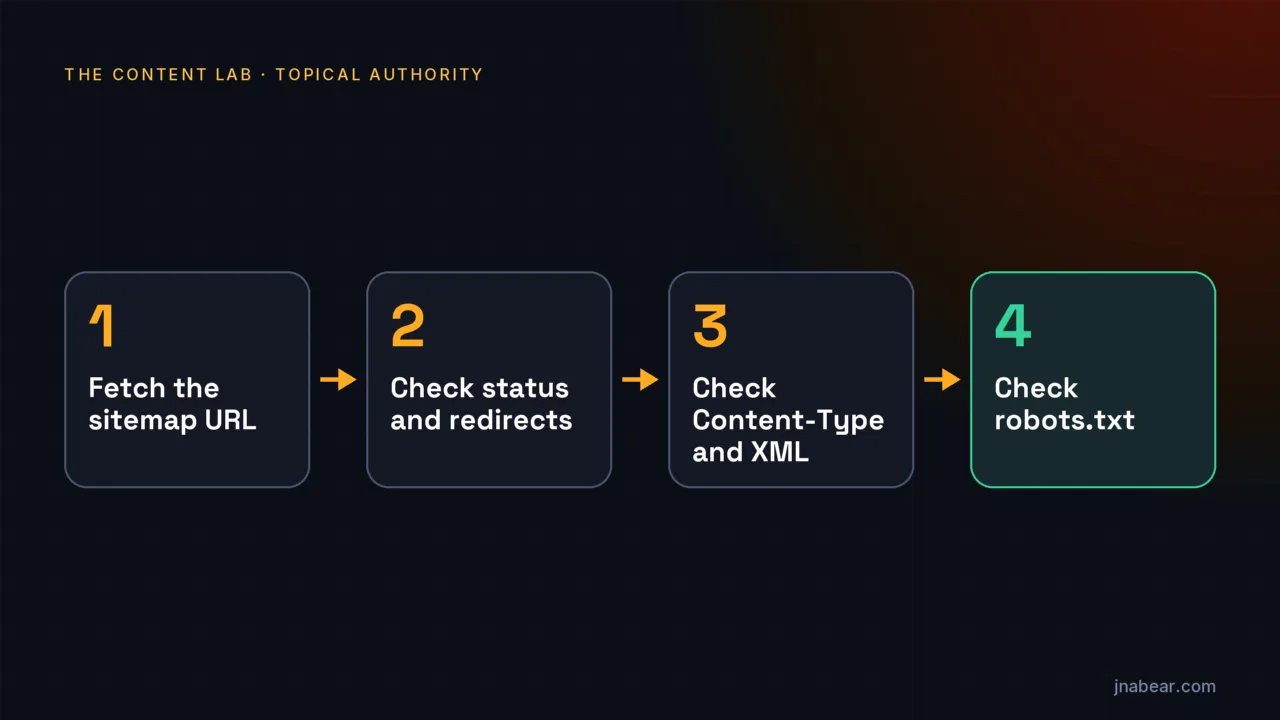
Open the exact sitemap URL you submitted, confirm it returns a 200 status with valid XML, check that robots.txt allows it, test it with URL Inspection, then resubmit it in the Sitemaps report.
- Copy the sitemap URL from the report's details page and open it in a private window. If it redirects, I submit the final address instead. That is my habit, not a Google rule: the report lists the exact URL you submitted, so submitting the final one keeps the report and the file in step.
- Check the response: a 200 status, a file that starts with the XML declaration, and a urlset or sitemapindex root in the sitemaps.org namespace.
- Check the size. Google's build guide says "All formats limit a single sitemap to 50MB (uncompressed) or 50,000 URLs."
- Check robots.txt. No Disallow rule should match the sitemap path for Googlebot, and a Sitemap line should name the file.
- Run the URL Inspection live test on the sitemap URL. Google says you want to see "Crawl allowed?" as "Yes" and "Page fetch" as "Successful."
- Open the Manual actions report. Google says "Sitemaps are not read when a site has an unresolved manual action."
- Resubmit. If the fetch still fails, Google says it "will retry for a few days, and then stop," so check back after a few days rather than resubmitting every hour.
# Status, redirects and Content-Type, in one request
curl -sIL https://www.example.com/sitemap.xml

# robots.txt: one line, anywhere in the file
Sitemap: https://www.example.com/sitemap.xml
To check the robots.txt step, paste your sitemap URL into the AI Crawler Checker. It reads your robots.txt and shows whether Googlebot may fetch that path. While you are in the file, list only the canonical version of each page, as Google's build guide asks. A duplicate URL in the sitemap can turn up in the Page indexing report as alternate page with proper canonical tag, which is harmless but adds noise.
Do website platforms serve broken sitemaps? A test of 75 sites
Mostly no. On Nov 10, 2026, 67 of 75 public sites on Shopify, Wix, Squarespace, WordPress and Webflow served a readable sitemap, and robots.txt blocked the sitemap on none of the 75. Readable here means it passed a strict XML parser. One of the other 8 failed only because of a blank first line, which Google says won't prevent it from processing the sitemap, so by Google's own standard the count is 68 of 75.
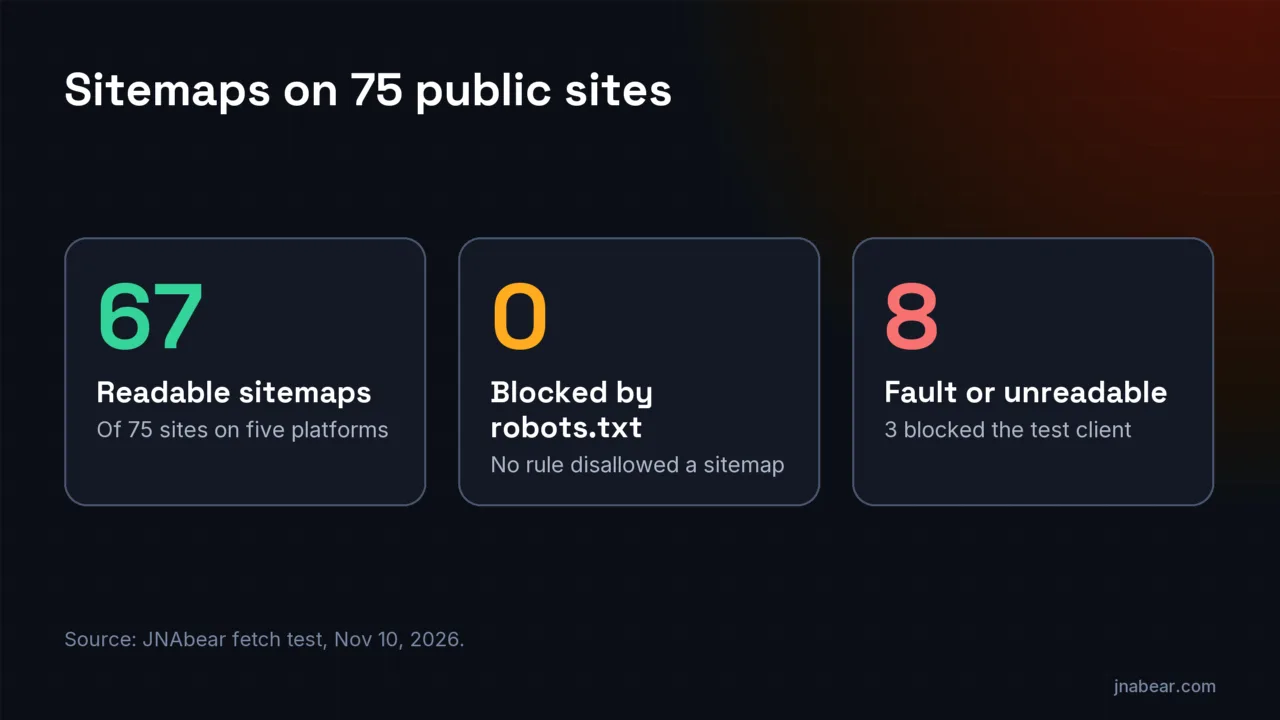
Readable means the sitemap returned a 200 status, after any redirect, parsed as XML with a strict parser, used the sitemaps.org namespace, stayed under 50,000 entries in the file fetched and was not disallowed for Googlebot. I fetched /sitemap.xml on every site and every sitemap its robots.txt declared, 96 sitemap URLs in all. Every declared sitemap was readable except one.
| Platform | Sites | Readable sitemap | /sitemap.xml redirected | Index file at /sitemap.xml | Sitemap line in robots.txt |
|---|---|---|---|---|---|
| Shopify | 15 | 15 | 6 | 15 | 15 |
| Wix | 15 | 15 | 0 | 15 | 15 |
| Squarespace | 15 | 15 | 1 | 0 | 15 |
| Webflow | 15 | 12 | 0 | 1 | 10 |
| WordPress | 15 | 10 | 8 | 9 | 9 |
| All five | 75 | 67 | 15 | 40 | 64 |
Sitemap fetch test, Nov 10, 2026 (CSV)
All 96 sitemap URLs from 75 sites, plus this site as a reference: status chain, Content-Type, XML checks, entry counts and robots.txt result. Free to reuse with a link to this page.
The eight sites without a readable sitemap broke down like this. Three of them say more about my test client than about the sites:
| What the test got | Sites | Platform | What it tells you |
|---|---|---|---|
| 403 "Checking your browser" page for both robots.txt and the sitemap | 3 | WordPress | A bot challenge blocked my client. What Googlebot gets is unknown |
| 404 at /sitemap.xml, and no Sitemap line (one site has no robots.txt at all) | 2 | Webflow | No sitemap where Google would look first |
| 500 with an empty body for robots.txt and the sitemap | 1 | Webflow | A server error, at least to my client |
| /sitemap.xml redirected to the home page, and robots.txt redirected in a loop | 1 | WordPress | No sitemap, and no readable robots.txt |
| Declared sitemap starts with a blank line before the XML declaration | 1 | WordPress | Strict XML parsers reject it. Google says it still processes it |
Google's docs say how much each fault matters. The blank line is the mildest: Google's help lists it as "Leading whitespace" and says "This error won't prevent Google from processing your sitemap." The robots.txt loop is worse, because Google "follows at least five redirect hops" and then "treats it as a 404 for the robots.txt file." A 500 on robots.txt is the most serious if Googlebot gets it too: Google says that "For the first 12 hours, Google stops crawling the site but keeps trying to fetch the robots.txt file."
Three patterns in the readable files are worth knowing if you see a sitemap could not be read message on one of these platforms:
- Webflow served 11 of its 12 readable sitemaps with the Content-Type application/rss+xml, not an XML type. The files themselves were standard sitemaps. None of the Google pages I read names a required Content-Type, so I cannot say this matters.
- All 15 Squarespace sites (16 sitemap files) and 6 WordPress sites with readable sitemaps sent an X-Robots-Tag: noindex header. In its section on deleting a sitemap, Google's Sitemaps help says: "To prevent Google from continuing to visit the sitemap or any URL listed in it, use any of the following methods." One of them is "Add a noindex rule or response header," and for a sitemap it says "you'll need to use a response header." A public fetch cannot show whether these headers change how Google reads these files.
- Every redirect on /sitemap.xml ended at a working sitemap except one. Six Shopify stores sent the bare domain to www, and seven of the eight WordPress redirects went to sitemap_index.xml or wp-sitemap.xml. One of those seven crossed to a different domain.
None of the 96 files fetched came close to the limits; child sitemaps listed in index files were not fetched. The largest file was a sitemap index listing 8,181 child sitemaps, and the largest single URL list had 2,286 URLs. None of the 75 sites served a gzipped sitemap file, though 86 of the 87 readable files were compressed in transit.
How the test was run: I fixed the sample before fetching any sitemap. For each platform, I took sites in page order from public showcase pages: Shopify's examples page, the Squarespace showcase, the WordPress.org Showcase, a Wix blog post of 19 Wix sites, and three Webflow blog posts of example sites. One home-page request confirmed each platform from its headers or markup, and 12 candidates that did not load or did not match were skipped. Then one request at a time, a second apart, with the user agent JNAbear-AICrawlerCheck/1.0, the same one my crawler checker sends. It never imitates Googlebot or a browser. A public fetch can only find faults in the file and its robots.txt. It cannot see a manual action, crawl demand, or a firewall rule that treats Google differently.
What does a sitemap that Google can read look like?
A readable sitemap returns a 200 status, serves UTF-8 XML whose root is urlset or sitemapindex in the sitemaps.org namespace, stays under 50,000 URLs and 50MB uncompressed, and is not blocked by robots.txt. I also submit the final URL rather than one that redirects.
This site is the clean reference. On Nov 10, 2026, jnabear.com/sitemap.xml returned a 200 status with no redirect, Content-Type application/xml, and a well-formed urlset of 114 URLs. robots.txt declares it with one line, "Sitemap: https://jnabear.com/sitemap.xml," and no rule disallows it for Googlebot.
| Check | Clean value | Google's wording |
|---|---|---|
| Status at the submitted URL | 200. Submit the final URL, not one that redirects | A wrong URL is a fetch cause: "HTTP 404 error: sitemap not found at the address provided." |
| Encoding | UTF-8 | "The sitemap file must be UTF-8 encoded." |
| Root and namespace | urlset or sitemapindex, http://www.sitemaps.org/schemas/sitemap/0.9 | "The namespace in the header must be "http://www.sitemaps.org/schemas/sitemap/0.9" (not .9)." |
| Size | Up to 50,000 URLs and 50MB uncompressed | "All formats limit a single sitemap to 50MB (uncompressed) or 50,000 URLs." |
| URLs listed | Absolute, canonical URLs | "Use fully-qualified, absolute URLs in your sitemaps." |
| robots.txt | Not disallowed, and named in a Sitemap line | "Google respects robots.txt when fetching sitemaps." |
Why does Search Console say "Sitemap could not be read" on Shopify?
All 15 Shopify stores in a Nov 10, 2026 fetch test served a readable sitemap index, so on Shopify, check the submitted URL, the property and the timing before the file itself.
Six of the 15 stores redirected the bare domain to www before serving the sitemap, and all six still reached a working file. Google's help warns to make sure "you're not confusing http/https, or www/non-www properties." Submit the final www or non-www URL in the property that matches it. If the URL and property are right, the remaining causes are the ones a store owner cannot see from outside: low crawl demand, a transient error, or a manual action.
What does "No referring sitemaps detected" mean?
"No referring sitemaps detected" in URL Inspection means Google could not match the page to any sitemap submitted in Search Console or listed in your robots.txt. Google's help lists the value as "No referring sitemap." I read it as a discovery note rather than an indexing error.
The help defines it: "No referring sitemap: Google couldn't identify a sitemap that refers to this page." The field covers only "sitemaps submitted using the Sitemaps report or listed in the robots.txt file for this site." Google also lists a known issue: "In a few cases, we don't report the sitemap for a page that was submitted in a sitemap." And the live test will not help here, because it "does not check for the presence of the URL in any sitemaps or any referring pages."
If the page belongs in your sitemap, add it and wait for the next read. If the page is already indexed but not ranking, a sitemap will not change that. The reasons sit with the page and the results it competes with.
Does a small site need a sitemap at all?
Often not. Google says you might not need a sitemap if your site has about 500 pages or fewer, links all its important pages internally, and has few media files or news pages you want shown in search.
Google's overview defines it: "By small, we mean about 500 pages or fewer on your site." Its build guide adds that "submitting a sitemap is merely a hint: it doesn't guarantee that Google will download the sitemap or use the sitemap for crawling URLs on the site." So on a small, well-linked site, a sitemap stuck at "Couldn't fetch" is worth fixing for tidiness, not an emergency. Your pages can still be found through links.
When is a sitemap error worth paying to fix?
Rarely when the file is the problem: in a Nov 10, 2026 fetch test of 75 public sites on five platforms, 67 served a readable sitemap. Paid help makes sense when the cause is hosting, firewall or redirect settings, or a large site listing URLs it should not.
If a sitemap could not be read because of a firewall, a bot challenge or a redirect setup, the fix belongs in the build. That is part of the web design work I deliver with Stoute Web Solutions, where the sitemap, robots.txt and redirects are set before launch. If the sitemap lists hundreds of URLs that redirect, return errors or point elsewhere with a canonical, a content audit sorts which pages to keep, redirect or remove.
Disclosure: those are services I sell, so weigh the source. If your sitemap passed the checks above, you need neither.
Sources
- Google Search Console Help: Sitemaps report (opens in a new tab) (verified Nov 2026)
- Google Search Central: Build and submit a sitemap (updated Jul 8, 2026) (opens in a new tab) (verified Nov 2026)
- Google Search Central: What is a sitemap (updated Dec 10, 2025) (opens in a new tab) (verified Nov 2026)
- Google Search Console Help: URL Inspection tool (opens in a new tab) (verified Nov 2026)
- Google Crawling Infrastructure: How Google interprets the robots.txt specification (updated Oct 23, 2026) (opens in a new tab) (verified Nov 2026)
- Vercel Community: GSC cannot read any sitemap served from Vercel, cross-host experiment (Aug 23, 2026) (opens in a new tab) (verified Nov 2026)
Topics & entities in this article
Frequently asked questions
In practice, yes. The main Sitemaps report shows "Couldn't fetch," and Google's help says that when the details page shows "Sitemap could not be read," the fetch failed. Google read no URLs from the sitemap on that attempt.
Google's Sitemaps help says it "will retry for a few days, and then stop" if the sitemap stays unavailable. After you fix the problem, resubmit the sitemap in the Sitemaps report so Google requests it again.
Not by itself. Google says "A later failure or success to read a sitemap will not cause Google to 'forget' the information from previous reads." Pages Google already found stay known, and pages can still be found through links.
Yes. Google's help says "Google respects robots.txt when fetching sitemaps," so a Disallow rule that matches the sitemap path stops the fetch. In a Nov 10, 2026 test of 75 public sites, robots.txt blocked the sitemap on none of them.
It can be, but none of the 75 sites in my Nov 10, 2026 test served a gzipped file. Google's limit is 50MB uncompressed or 50,000 URLs per sitemap. A broken compressed file shows in the report as "Compression error."
The report shows only sitemaps submitted in the report or through the API, not ones Google found through robots.txt. It also shows only the current property, so check https versus http and www versus non-www.
Related service
Content Audits
A content audit inventories every page on your site and grades what to keep, improve, merge, or remove, for established sites whose content has plateaued or declined.
Disclosure: this is a service I sell.