"BEGIN Cloudflare Managed content" in robots.txt: What It Is, and Why Lighthouse or Search Console Flags It
Quick answer
"# BEGIN Cloudflare Managed content" is a comment Cloudflare writes into robots.txt to mark rules it adds when Bot Preference Sync is on and an AI crawler policy blocks something. With Training set to Disallow, the block adds a Content-signal line and disallows named AI training bots. Lighthouse before v13.0.2 calls that line an "Unknown directive." Google ignores it, and the Disallow rules still apply.
Key takeaways
- Cloudflare adds the block only when "Enable Bot Preference Sync" is on and a Search, Agent or Training policy blocks something (Cloudflare docs, updated Nov 2, 2026).
- With Training set to Disallow, the case Cloudflare documents, the block sets "Content-signal: search=yes, ai-train=no, use=reference" for every crawler and disallows named AI training bots: 8 in Cloudflare's docs example, 32 in its live example file on Nov 10, 2026.
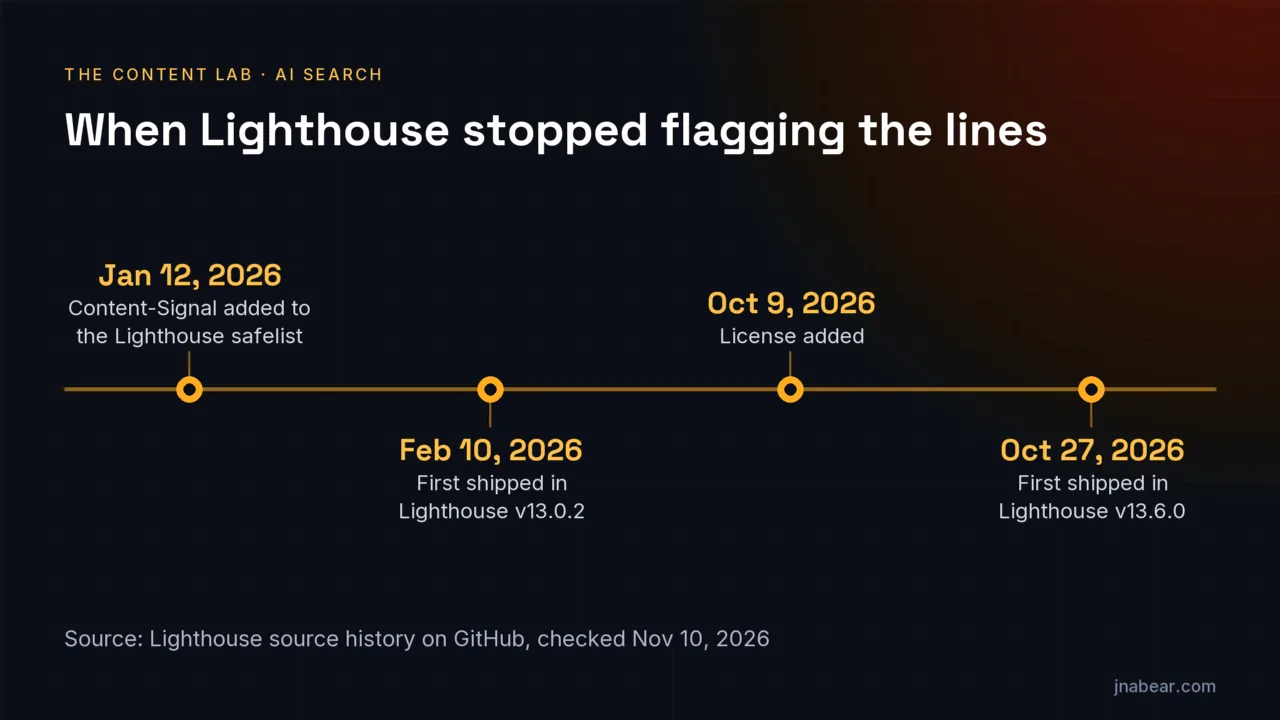
- Lighthouse added Content-Signal to its robots.txt safelist on Jan 12, 2026 (PR #16767). The first release with it is v13.0.2, published Feb 10, 2026. Older versions report "Unknown directive."
- Lighthouse accepted License in v13.6.0 (Oct 27, 2026). Agentmap was merged on Nov 3, 2026 and was in no release yet on Nov 10, 2026.
- Google's parser ignores fields other than user-agent, allow, disallow and sitemap, so the Content-signal line changes nothing for Googlebot. The Disallow groups still apply.
- Cloudflare's docs say Search Console "may occasionally report Syntax not understood" for Content Signals, with no observed impact on crawling or SEO.
- On Nov 10, 2026, none of the 16 readable robots.txt files from 20 well-known Cloudflare sites carried the managed block. Four sent a Cloudflare challenge or block page instead.
On this page (10)
What does "BEGIN Cloudflare Managed content" mean in robots.txt?
"# BEGIN Cloudflare Managed content" is a comment line that Cloudflare writes into robots.txt to mark where its managed rules start. A matching "# END Cloudflare Managed Content" line marks where the site's own rules begin.
The block comes from Cloudflare's managed robots.txt setting. When your origin server already has a robots.txt file, Cloudflare's docs say it will "prepend our managed robots.txt before your existing robots.txt, combining both into a single response." Lines that start with # are comments, so the BEGIN and END markers mean nothing to a crawler. What sits between them does. In the case Cloudflare documents, Training set to Disallow, that is a group for every crawler with a Content-signal line, then one Disallow group per named AI bot.
One detail helps if you are searching your own file. The two markers differ in case, "Managed content" at the start and "Managed Content" at the end, in both Cloudflare's docs and its live example file (checked Nov 10, 2026). Search without matching case, for example with grep -i.
What does the Cloudflare managed robots.txt block contain?
When Training is set to Disallow, the case Cloudflare documents, the Cloudflare managed robots.txt block holds a "User-Agent: *" group with "Content-signal: search=yes, ai-train=no, use=reference" and "Allow: /", then one "Disallow: /" group for each named AI training crawler.
# BEGIN Cloudflare Managed content

User-Agent: *
Content-signal: search=yes, ai-train=no, use=reference
Allow: /

User-agent: Amazonbot
Disallow: /

User-agent: Applebot-Extended
Disallow: /

User-agent: Bytespider
Disallow: /

User-agent: CCBot
Disallow: /

User-agent: ClaudeBot
Disallow: /

User-agent: Google-Extended
Disallow: /

User-agent: GPTBot
Disallow: /

User-agent: meta-externalagent
Disallow: /

# END Cloudflare Managed Content
That is the example in Cloudflare's docs, last updated Nov 2, 2026. It names eight bots: Amazonbot, Applebot-Extended, Bytespider, CCBot, ClaudeBot, Google-Extended, GPTBot and meta-externalagent. The live file is longer. On Nov 10, 2026, the robots.txt of crawlstop.com, the site Cloudflare's docs use as the example, listed 32 named user agents in its managed block. They included Diffbot, MistralAI-Training, GoogleOther and Baiduspider. Its line was also written without spaces: "Content-Signal: search=yes,ai-train=no,use=reference". Cloudflare's docs also say the Search and Agent policies "add their respective managed directives" when set to block, but the page does not show what those directives are. So read your own file to see what it holds, not the docs.
Your own rules still count. The managed "User-Agent: *" group and your own "User-agent: *" group both apply to every crawler that is not named elsewhere. I ran this site's own RFC 9309 parser on Cloudflare's example file. Googlebot was allowed at / but blocked at /lp, a rule from the origin's part of the file. All eight named bots were blocked at /. Search crawlers the block does not name, such as OAI-SearchBot and Claude-SearchBot, were allowed.
When does Cloudflare add the managed block to robots.txt?
Cloudflare adds the managed block only when Bot Preference Sync is turned on and at least one Search, Agent or Training policy is set to block. With every policy set to allow, Cloudflare serves your robots.txt unchanged.
Cloudflare's docs put the condition this way: managed directives appear "only when Enable Bot Preference Sync is turned on and at least one of your Search, Agent, or Training policies is set to Block, Block on pages with ads, or, for Training, Disallow." The settings sit in the Cloudflare dashboard under Security Settings, filtered by Bot traffic, in AI Crawler and Agent access policies. Setting Training to Disallow also turns on what Cloudflare calls edge blocking for training crawlers, and the docs add that "Mixed-use crawlers are excluded from this edge block." If the origin has no robots.txt at all, Cloudflare creates one with the managed rules and serves it.
The feature is "available on all plans," per the same page. The Free plan has one extra behavior. A Free-plan domain with no robots.txt of its own, and without the managed setting, shows the Content Signals Policy when a crawler asks for robots.txt. That is a long block of comments that defines search, ai-input and ai-train. Cloudflare says it "does not express any specific preferences about your content," so it carries no Content-signal line and no BEGIN marker.
What does "Content-signal: search=yes, ai-train=no, use=reference" mean?
The Content-signal line "search=yes, ai-train=no, use=reference" allows search indexing, refuses AI model training, and permits reuse at the reference level, which Cloudflare defines as "Index, excerpt, and link back."
The comments Cloudflare adds above the block define each signal. "search" means "building a search index and providing search results," and Cloudflare notes that search "does not include providing AI-generated search summaries." "ai-train" means "training or fine-tuning AI models." The managed line leaves out ai-input, which covers feeding content into AI answers. Under the policy's own clause (c), an unset signal means the site "neither grants nor restricts permission" for that use.
The use= field is newer. Cloudflare says it "is testing content-use," a fourth field with three values: use=immediate, use=reference and use=full. The comments also claim that restrictions are reservations of rights under Article 4 of EU Directive 2019/790. None of this binds a crawler. Cloudflare's page says plainly that "robots.txt compliance is voluntary," and points to AI Crawl Control for enforcement. If you are weighing Content-Signal against the __usage_ai-training token, my opt-out guide compares the two.
Why does Lighthouse say robots.txt is not valid on a Cloudflare site?
Lighthouse versions before 13.0.2 do not know the Content-signal field, so the robots-txt audit lists that line as "Unknown directive" and reports "robots.txt is not valid." Lighthouse 13.0.2 and later accept it.
The audit checks every field name against a fixed safelist in core/audits/seo/robots-txt.js. Anything else throws the error "Unknown directive." Lighthouse pull request #16767 added content-signal to that list. It was merged on Jan 12, 2026, and the first release tag that contains it is v13.0.2, published Feb 10, 2026. The release before it, v13.0.1, does not. Pull request #17160 added license, for the Really Simple Licensing standard, on Oct 9, 2026, and first shipped in v13.6.0 on Oct 27, 2026. Pull request #17484 added agentmap on Nov 3, 2026. On Nov 10, 2026, v13.6.0 was still the latest release, so agentmap had not shipped.
| Lighthouse version | Content-signal | License | Agentmap |
|---|---|---|---|
| v13.0.1 and earlier | Unknown directive | Unknown directive | Unknown directive |
| v13.0.2 to v13.5.0 | Accepted | Unknown directive | Unknown directive |
| v13.6.0 (latest release on Nov 10, 2026) | Accepted | Accepted | Unknown directive |
| Main branch after Nov 3, 2026 (unreleased) | Accepted | Accepted | Accepted |
I tested the first three rows rather than trusting the commit log. I copied the validation functions from robots-txt.js at tags v13.0.1, v13.0.2, v13.5.0 and v13.6.0. Then I ran them on three files: Cloudflare's docs example, crawlstop.com's live file and cloudflare.com's own robots.txt. Version 13.0.1 found one error in each file, the Content-signal line, marked "Unknown directive." The three later versions found none. A test file with License and Agentmap lines matched the table too.
The warning costs points, not crawling. In v13.6.0 the robots-txt audit is one of ten weighted audits in the SEO category. A failure is worth about 8 percent of that score when every audit applies (my arithmetic from the weights in Lighthouse's default config). The fix is to check the version. A Lighthouse report prints it in the summary line ("with Lighthouse 13.6.0") and at the bottom of the report. If it is older than 13.0.2, the warning is a tool limitation that Lighthouse has since fixed. PageSpeed Insights runs Lighthouse too, so the same version rule applies there.
Does Search Console flag the Content-signal line in robots.txt?
Search Console can flag the Content-signal line. Cloudflare's docs say Search Console "may occasionally report Syntax not understood" for Content Signals, and Google's robots.txt report ignores lines with issues and uses the rest.
Google's help for the robots.txt report says: "Google ignores the lines with issues and uses those that it can parse." It also separates two kinds of issue: "Errors prevent a rule from being used. Warnings do not prevent a rule from being used." A Content-signal line is not a rule in Google's sense, since Google's robots.txt spec names only allow and disallow as rules. So nothing is lost when the line is skipped. Cloudflare reaches the same place from its side: "we have observed no impact on crawling rates or SEO as a result of these reports."
I have not seen the flag in this site's own Search Console, because jnabear.com has no managed block. The report lists robots.txt files for the top 20 hosts in a Domain property and lets you request a recrawl after a fix.
How do Search Console, Lighthouse and Google's parser read the managed block?
Search Console may mark the Content-signal line "Syntax not understood," Lighthouse before 13.0.2 marks it "Unknown directive," and Google's open-source robots.txt parser skips it. None of the three discards the Allow and Disallow groups around it.
| Search Console robots.txt report | Lighthouse robots-txt audit | Google robotstxt parser | |
|---|---|---|---|
| What it is | Google's report of how it fetched and parsed the file | A validator in Chrome DevTools, the CLI and PageSpeed Insights | The open-source C++ library Google says is "also used in Google Search" |
| What it says about Content-signal | "Syntax not understood" at times, per Cloudflare's docs | "Unknown directive" before v13.0.2; nothing from v13.0.2 on | Nothing: unknown keys go to a handler that does nothing |
| Effect on the rules | Google uses the lines it can parse | None: Lighthouse only validates the file | None: the line does not end the group, and the Disallow groups apply |
| Where I read it | Google's robots.txt report help, Cloudflare's docs | Lighthouse source at tags v13.0.1 to v13.6.0 | robots.cc at commit 22b355f |
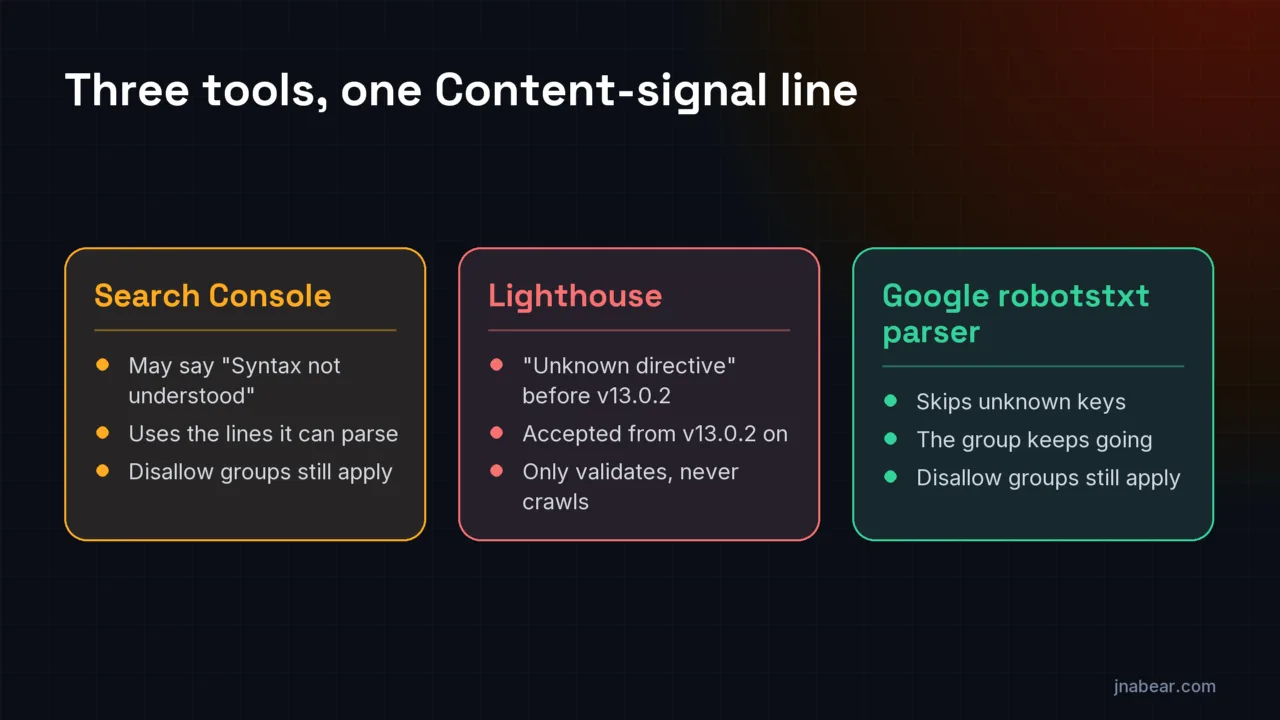
The parser column comes from reading Google's source, not from running it; I did not build the C++ library. In robots.cc, GetKeyType returns UNKNOWN for any key other than user-agent, allow, disallow and sitemap, plus a few accepted typos such as "disalow." Unknown keys go to RobotsMatcher::HandleUnknownAction, whose body is empty. That handler also leaves the group state alone, so the "User-Agent: *" group carries on to its "Allow: /" line. Google's robots.txt spec, updated Oct 23, 2026, says the same in prose: "Rules other than allow, disallow, and user-agent are ignored by the robots.txt parser."
What does "Lighthouse was unable to download a robots.txt file" mean behind Cloudflare?
"Lighthouse was unable to download a robots.txt file" means the robots.txt request failed with no HTTP status at all, such as a timeout. Lighthouse 13.4.1 and later word the same failure "Fetch of robots.txt failed."
That older message was in Lighthouse up to v13.4.0. Pull request #17083 replaced it on June 18, 2026, and the change first shipped in v13.4.1 on July 20, 2026. Newer reports add the error itself, as in "Fetch of robots.txt failed: Timed out fetching resource." Lighthouse's fetcher gives the request 2,000 milliseconds by default. Status codes are handled separately. A 4xx response marks the audit not applicable, so Lighthouse leaves it out of the SEO score. A 5xx response fails it with "Request for robots.txt returned HTTP status," and since v13.6.0 a 429 does too.
Cloudflare can sit in the way. In my check below, 4 of 20 Cloudflare sites answered a plain request for robots.txt with a Cloudflare challenge or block page and a 403 status, not the file. My request named itself as a bot, and Lighthouse runs inside Chrome, so its results can differ. If Lighthouse got that 403, the audit would show as not applicable rather than "unable to download." A 403 to Googlebot is a different and more serious problem. To clear the download message, open /robots.txt yourself. Check that firewall or bot rules do not challenge that path, and that it answers in well under two seconds.
How many Cloudflare sites use the managed robots.txt block? A check of 20 sites
None of the 16 readable files in my 20-site sample carried the "BEGIN Cloudflare Managed content" block. That is a small sample of well-known sites served through Cloudflare, read on Nov 10, 2026.
| Result | Sites |
|---|---|
| Served through Cloudflare (cf-ray header on the response) | 20 of 20 |
| Returned a robots.txt file | 16 |
| Returned a Cloudflare challenge page with a 403 | 3: Udemy, npm, Stack Overflow |
| Returned a Cloudflare block page with a 403 | 1: Zendesk |
| Carried the managed block | 0 of 16 |
| Showed the Content Signals Policy comments | 0 of 16 |
| Had a hand-written Content-Signal line | 2: Cloudflare (ai-train=yes) and Patreon (ai-train=no, in two named groups) |
The two Content-Signal lines are telling. Cloudflare's own site writes "Content-Signal: ai-train=yes, search=yes, ai-input=yes" by hand, outside any managed block, so it invites training. The line follows the Cohere-ai group with no new User-agent line in between, so a strict RFC 9309 parser attaches it to that group. Patreon puts "ai-train=no" inside the groups for two named crawlers. jnabear.com is served through Cloudflare too, and its robots.txt has no managed block (checked Nov 10, 2026). The file allows training crawlers on purpose.
How the check was run: the 20 sites were Cloudflare, Discord, Medium, Canva, Shopify, Zendesk, Udemy, Coinbase, npm, GitLab, Quora, Patreon, HubSpot, Notion, Upwork, Glassdoor, Stack Overflow, DigitalOcean, Substack and Chess.com. The list was written down before any file was fetched. Each got one request, in sequence, with a 15-second timeout, following redirects, from a user agent that named this site and did not imitate a browser or Googlebot. Twenty large sites say little about small ones, which may be more likely to flip a dashboard switch than to write their own file.
Cloudflare managed robots.txt check, Nov 10, 2026 (CSV)
All 20 sites plus jnabear.com: status, Cloudflare header, challenge or block page, managed block, and any Content-Signal line. Free to reuse with a link to this page.
Should you remove the Cloudflare managed block from robots.txt?
Keep the Cloudflare managed block if you want AI training crawlers refused, because Lighthouse 13.0.2 and later accept it and Google ignores the Content-signal line. Remove it only if its bot list blocks a crawler you want.
To remove it, set every AI Crawler and Agent access policy to allow, or turn off Bot Preference Sync. Cloudflare's docs say that "With every policy set to allow, there is nothing to prepend and your robots.txt is served unchanged." Then reload /robots.txt to confirm the BEGIN and END lines are gone. Before you decide, compare the bot list with your plans. The live list on Cloudflare's example site named 32 user agents, including GoogleOther and Baiduspider, which some sites may want to allow.
You can check what your live robots.txt allows each AI crawler with the AI Crawler Checker, which reads the file with the same parser I used above. For the wider question of which crawlers to allow, see my guide to robots.txt rules for AI crawlers.
Planning robots.txt and Cloudflare settings before launch is part of our web design work, delivered with Stoute Web Solutions, so a new site does not ship with rules nobody chose. Disclosure: that is a service I sell, so weigh the source. A single "Unknown directive" line in an old Lighthouse report needs no paid help, only the version check above.
Sources
- Cloudflare Docs: robots.txt setting (managed robots.txt, updated Nov 2, 2026) (opens in a new tab) (verified Nov 2026)
- crawlstop.com/robots.txt, the live example file Cloudflare's docs link to (opens in a new tab) (verified Nov 2026)
- Lighthouse PR #16767: add Content-Signal directive (merged Jan 12, 2026) (opens in a new tab) (verified Nov 2026)
- Lighthouse PR #17160: add License directive (merged Oct 9, 2026) (opens in a new tab) (verified Nov 2026)
- Lighthouse PR #17484: allow agentmap directive (merged Nov 3, 2026) (opens in a new tab) (verified Nov 2026)
- Lighthouse PR #17083: show details when fetch fails for robots.txt (merged June 18, 2026) (opens in a new tab) (verified Nov 2026)
- Lighthouse release v13.0.2 (Feb 10, 2026) (opens in a new tab) (verified Nov 2026)
- Lighthouse release v13.6.0 (Oct 27, 2026) (opens in a new tab) (verified Nov 2026)
- Lighthouse source: robots-txt audit at v13.6.0 (opens in a new tab) (verified Nov 2026)
- Lighthouse source: fetcher timeout at v13.6.0 (opens in a new tab) (verified Nov 2026)
- Lighthouse source: SEO category weights at v13.6.0 (opens in a new tab) (verified Nov 2026)
- Lighthouse source: report summary line and footer version at v13.6.0 (opens in a new tab) (verified Nov 2026)
- Google Search Console Help: robots.txt report (opens in a new tab) (verified Nov 2026)
- Google Crawling Infrastructure: How Google interprets the robots.txt specification (updated Oct 23, 2026) (opens in a new tab) (verified Nov 2026)
- Google robotstxt parser source: unknown keys (robots.cc, commit 22b355f) (opens in a new tab) (verified Nov 2026)
- Google robotstxt parser source: empty HandleUnknownAction (robots.cc, commit 22b355f) (opens in a new tab) (verified Nov 2026)
Topics & entities in this article
Frequently asked questions
No. It is a comment line, and crawlers skip lines that start with #. It marks where Cloudflare's managed rules begin, and "# END Cloudflare Managed Content" marks where they end.
Check the Lighthouse version in the report. Before 13.0.2, the Content-signal line is flagged as "Unknown directive." On 13.0.2 or later, look at which line the audit names, for example License before 13.6.0 or Agentmap in 13.6.0. A 5xx status for robots.txt also fails the audit, and so does a 429 from v13.6.0 on.
Google's robots.txt spec says "Rules other than allow, disallow, and user-agent are ignored by the robots.txt parser," and Google's open-source parser skips unknown keys. Cloudflare says it has seen no impact on crawling rates or SEO from Search Console's reports.
Set every AI Crawler and Agent access policy to allow, or turn off Bot Preference Sync, in the Cloudflare dashboard's Security Settings. Cloudflare says that with every policy set to allow, your robots.txt "is served unchanged." Reload /robots.txt to confirm.
Cloudflare's docs example names eight: Amazonbot, Applebot-Extended, Bytespider, CCBot, ClaudeBot, Google-Extended, GPTBot and meta-externalagent. The live file of Cloudflare's example site named 32 user agents on Nov 10, 2026, so read your own robots.txt for the current list.
No. Cloudflare prepends its block to your existing file and serves both as one response. In my parser test of Cloudflare's example, the origin's "Disallow: /lp" still applied to Googlebot.
Not by force. Cloudflare's docs say "robots.txt compliance is voluntary" and that some operators may ignore it. Cloudflare points to AI Crawl Control to enforce blocks.
Related service
Web Design & SEO
Web design and SEO in one project: custom WordPress websites for businesses that need a new or rebuilt site.
Disclosure: this is a service I sell.